10 · Schedules, Start Delay & Cron Jobs: running Workflows on a clock
Level: sub-feature (time-based starts) · Read time: ~25 min Sources: Encyclopedia — Schedule · Encyclopedia — Cron Job · Encyclopedia — Timers and Start Delays · Encyclopedia — Workflow Pause · Go SDK — Schedules
1. The problem
A lot of business work runs on a clock, not on a user click:
- "Build the sales report every weekday at 06:00 UTC, except on Christmas."
- "Send the trial-expiry reminder in 13 days, once."
- "Reconcile payouts every hour. If the previous run is still going, don't start a second one."
Without Temporal you would run a crontab on some VM, add a lock so two runs don't overlap, write a "catch up after the outage" script, and find a way to pause it during incidents. If the VM dies at 05:59, the report silently never runs.
Temporal gives you three tools that start Workflow Executions for you, durably, from the Temporal Service:
| Tool | Use it when… | Status |
|---|---|---|
| Schedule | the start is recurring (every 30 min, every Monday at noon…) | ✅ recommended |
| Start Delay | the start happens once, at a future point | ✅ for one-off delays |
| Temporal Cron Job | you maintain old code that already uses it | ⚠️ legacy: "We recommend using Schedules instead of Cron Jobs" |
💡 Inside a running Workflow you wait with Timers (
workflow.Sleep,workflow.NewTimer, see 05). The tools in this chapter decide when an Execution starts.
2. Schedules: the mental model
A Schedule is an object with its own identity (the Schedule ID), separate from any Workflow Execution. That is the big difference with a Cron Job, where the cron string is just a property of one Workflow Execution.
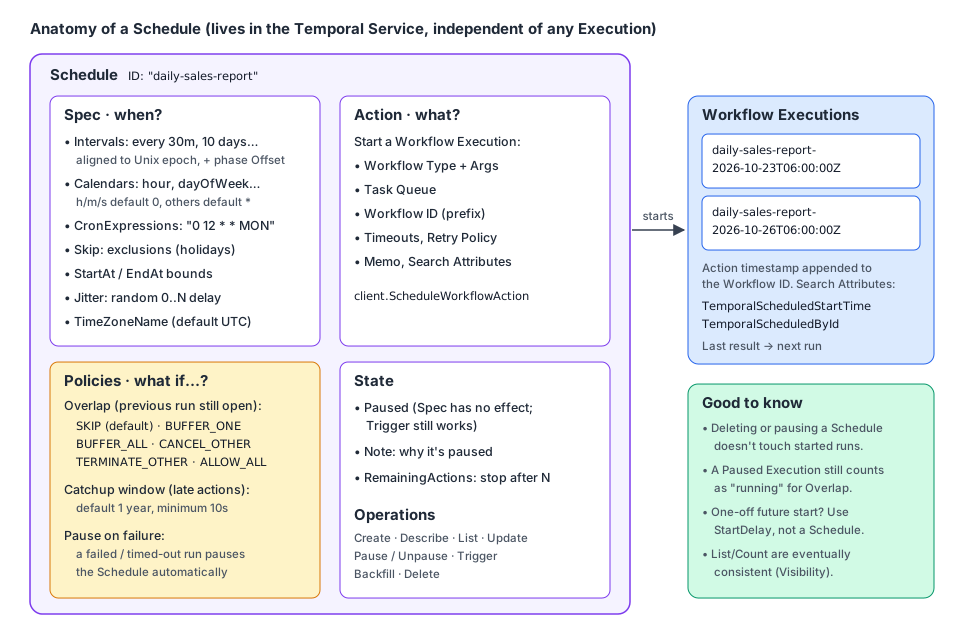
A Schedule has four parts:
| Part | What it holds | Go type |
|---|---|---|
| Spec | When to act: intervals, calendar expressions, cron strings, exclusions, start/end bounds, jitter, time zone | client.ScheduleSpec |
| Action | What to start: Workflow Type, Task Queue, arguments, timeouts, retry policy, memo | client.ScheduleWorkflowAction |
| Policies | How to behave on overlap, lateness and failures | client.ScheduleOptions.Overlap, .CatchupWindow, .PauseOnFailure |
| State | Paused or not, a note for humans, a limited number of remaining actions | client.ScheduleOptions.Paused, .Note, .RemainingActions |
Workflow Executions started by a Schedule get three extra properties:
- The Action's timestamp is appended to the Workflow ID (so each run has a distinct ID).
- The
TemporalScheduledStartTimeSearch Attribute holds that timestamp. - The
TemporalScheduledByIdSearch Attribute holds the Schedule ID.
Unless many Schedules fire at the same moment, Actions start within about 1 second of the specified time.
📝 Internally, a Schedule is implemented as a Workflow.
ListSchedulesandCountSchedulesare served by the Visibility subsystem: they share the Visibility API rate limit and are eventually consistent, so a Schedule you just created or deleted may not show up in a list right away.
3. The Spec: describing when
There are two kinds of spec. You can combine several of each in one Schedule; the times are the union of all of them, minus the Skip times.
3.1 Intervals and the phase offset
client.ScheduleIntervalSpec{Every: 30 * time.Minute} means "every 30 minutes". Intervals are aligned to the Unix epoch (1970-01-01 00:00 UTC). For short intervals you don't care. For long ones you do: a 7-day interval with no offset fires every Thursday at midnight UTC, because 1970-01-01 was a Thursday.
The Offset field (the "phase") shifts that alignment. The Schedule fires when:
(currentTimestampUTC - offset) % interval == 0To fire every 10 days, including 2024-06-19 at 17:00 UTC:
reference = 2024-06-19T17:00:00Z = 1718816400
interval  = 10 days = 864000 s
offset    = 1718816400 % 864000 = 320400 s   (= 3 days 17 h)
So you set Every: 10 * 24 * time.Hour, Offset: 320400 * time.Second. You can compute it in Go too (see TenDayPayoutSpec in section 6).
3.2 Calendars and cron strings
A calendar expression matches wall-clock fields, like cron. In Go it is a client.ScheduleCalendarSpec where each field is a list of client.ScheduleRange{Start, End, Step}:
| Field | Range | Default when empty |
|---|---|---|
Second, Minute, Hour | 0-59 / 0-59 / 0-23 | matches 0 |
DayOfMonth | 1-31 | all days |
Month | 1-12 | all months |
DayOfWeek | 0-6, 0 = Sunday | all days |
Year | any | all years |
Comment | free text describing the intent | — |
A ScheduleRange with only Start set is a single value (End defaults to Start, Step to 1). Because hour/minute/second default to 0, "every weekday at 06:00" only needs Hour and DayOfWeek.
If you prefer strings, ScheduleSpec.CronExpressions accepts classic cron strings such as "0 12 * * MON". Whatever form you use, Temporal converts it to a canonical representation, so Describe may show it differently from what you typed, with the same meaning.
3.3 Other spec features
| Feature | Go field | Notes |
|---|---|---|
| Exclusions | Skip []ScheduleCalendarSpec | "Every Monday at noon except holidays". You supply the holidays yourself: there are no predefined sets. All fields, seconds included, must match for a time to be skipped. |
| Time bounds | StartAt, EndAt | No actions before StartAt or after EndAt. |
| Jitter | Jitter | Adds a random 0..Jitter delay to each action, capped by the time to the next action. Useful so 500 Schedules don't all hit the same API at 06:00:00. |
| Time zone | TimeZoneName (IANA name) | Default is UTC, and Temporal recommends staying in UTC. With a DST zone, a 02:30 spec can fire zero or two times on transition days. |
4. Policies: what happens when things don't go to plan
4.1 Overlap Policy: the previous run is still running
Policy (enums.SCHEDULE_OVERLAP_POLICY_…) | Behavior |
|---|---|
SKIP (default) | Don't start the new run. |
BUFFER_ONE | Start it as soon as the current one finishes. At most one waits in the buffer; later ones are dropped. |
BUFFER_ALL | Buffer every action and run them one after the other (subject to the Catchup Window and internal buffer limits). |
CANCEL_OTHER | Request cancellation of the running one, start the new one after the old one finishes cancelling. |
TERMINATE_OTHER | Terminate the running one and start the new one, without waiting for Workflow cooperation. |
ALLOW_ALL | Start anyway. The only policy where several runs of the same Schedule can be open at once. |
4.2 Catchup Window: how late is too late?
If the Temporal Service was down, or an overlap policy delayed an action, the Catchup Window decides how late an automated action may still run. Default: 1 year. Minimum: 10 seconds. A sales report that runs at 14:00 instead of 06:00 is useless, so you set a short window and accept that a long outage means a missed run (you can always Backfill it later, see section 7). The window is measured from the jitter-adjusted time. Manual triggers and Backfills ignore it.
4.3 Pause-on-failure
With PauseOnFailure: true, a run that fails or times out (not one that is cancelled or terminated) pauses the Schedule automatically. A human then looks at it before more broken reports go out. With ALLOW_ALL, the pause only affects runs scheduled after the failed one finished.
4.4 Interaction with Workflow Pause
Workflow Pause (pre-release) pauses one Execution. It does not pause the Schedule that started it. A Paused Execution is still open, so it counts as "the running one" for the overlap policy: with SKIP every new action is skipped, with BUFFER_ONE one action waits, with CANCEL_OTHER the next start waits until the paused run processes the cancel (which only happens after Unpause), with TERMINATE_OTHER it is terminated.
🛠️ Runbook: if you pause a scheduled Execution to investigate, pause the Schedule too. When you're done, unpause the Execution, then unpause the Schedule, and Backfill any actions that were skipped.
Pausing a Schedule is the opposite: it stops future actions but doesn't touch Executions it already started.
5. The Workflow side: a report that knows yesterday's result
A Workflow started by a Schedule is a normal Workflow. Two extra APIs are useful:
workflow.HasLastCompletionResult(ctx)/workflow.GetLastCompletionResult(ctx, &v): the result of the most recent successful run. Failures and timeouts don't change it.workflow.GetLastError(ctx): the failure of the most recent run that ended before this one started. Unlike the completion result, a successful run resets it tonil.
// file: reporting/activities.go
package reporting

import (
	"context"
	"fmt"
	"time"
)

type DailySales struct {
	Day          string // "2026-10-23"
	OrderCount   int
	RevenueCents int64
}

// SalesWarehouse is the analytics database (BigQuery, ClickHouse...).
type SalesWarehouse interface {
	SalesForDay(ctx context.Context, day time.Time) (DailySales, error)
}

// ReportPublisher posts the report to Slack / email.
type ReportPublisher interface {
	Publish(ctx context.Context, title, body string) error
}

type ReportActivities struct {
	Warehouse SalesWarehouse
	Publisher ReportPublisher
}

func (a *ReportActivities) LoadDailySales(ctx context.Context, day time.Time) (DailySales, error) {
	return a.Warehouse.SalesForDay(ctx, day)
}

func (a *ReportActivities) PublishSalesReport(ctx context.Context, r DailySalesReport) error {
	body := fmt.Sprintf("%d orders, %.2f EUR (%+.1f%% vs previous report)",
		r.Today.OrderCount, float64(r.Today.RevenueCents)/100, r.RevenueChangePct)
	return a.Publisher.Publish(ctx, "Daily sales "+r.Today.Day, body)
}// file: reporting/workflow.go
package reporting
import (
"time"
"go.temporal.io/sdk/temporal"
"go.temporal.io/sdk/workflow"
)
const TaskQueue = "reporting"
type DailySalesReport struct {
Today DailySales
Previous *DailySales // nil on the very first successful run
RevenueChangePct float64
}
// scheduledStartTime is set by the Schedule on every Execution it starts.
var scheduledStartTime = temporal.NewSearchAttributeKeyTime("TemporalScheduledStartTime")
func DailySalesReportWorkflow(ctx workflow.Context) (DailySalesReport, error) {
logger := workflow.GetLogger(ctx)
ctx = workflow.WithActivityOptions(ctx, workflow.ActivityOptions{StartToCloseTimeout: 5 * time.Minute})
// Report on the day BEFORE the scheduled time, not before "now": a buffered or
// backfilled run may start late, but it must still report on the right day.
at, ok := workflow.GetTypedSearchAttributes(ctx).GetTime(scheduledStartTime)
if !ok {
at = workflow.Now(ctx) // started by hand, not by the Schedule
}
day := at.UTC().Truncate(24*time.Hour).AddDate(0, 0, -1)
// Did the previous run fail? Useful context for the on-call person.
if lastErr := workflow.GetLastError(ctx); lastErr != nil {
logger.Warn("Previous report run failed", "error", lastErr)
}
var a *ReportActivities
report := DailySalesReport{}
if err := workflow.ExecuteActivity(ctx, a.LoadDailySales, day).Get(ctx, &report.Today); err != nil {
return DailySalesReport{}, err
}
// The result returned by the last SUCCESSFUL run of this Schedule.
if workflow.HasLastCompletionResult(ctx) {
var previous DailySalesReport
if err := workflow.GetLastCompletionResult(ctx, &previous); err == nil && previous.Today.RevenueCents > 0 {
report.Previous = &previous.Today
delta := report.Today.RevenueCents - previous.Today.RevenueCents
report.RevenueChangePct = 100 * float64(delta) / float64(previous.Today.RevenueCents)
}
}
if err := workflow.ExecuteActivity(ctx, a.PublishSalesReport, report).Get(ctx, nil); err != nil {
return DailySalesReport{}, err
}
// Whatever we return becomes the next run's "last completion result".
return report, nil
}Things to know about the last completion result:
- Keep it small. A run may return up to the max blob size (2 MiB by default), but a result within 1 KiB of that limit is not passed to the next run. Return a summary, not raw data.
- Continue-As-New breaks the chain. If a scheduled run uses Continue-As-New, its status is
Continued-As-New, notCompleted, andLastCompletionResultisn't available to that new iteration. - With
ALLOW_ALL, "last" means "completed most recently when this run started". In the timeline below, D asks at time T and gets A's result: not B's (A completed later), and not C's (C completed after D started; the value is captured at start, not at query time).
time -------------------------------------------->
 A     |----------------------|
 B               |-------|
 C                          |---------------|
 D                                |--------------T
6. Operating Schedules from Go
All Schedule operations go through c.ScheduleClient(). Create returns a client.ScheduleHandle; later you get one back with GetHandle(ctx, scheduleID).
6.1 Create
// file: cmd/report-schedules/create.go
package main

import (
	"context"
	"fmt"
	"time"

	"github.com/acme/shop/reporting"
	enumspb "go.temporal.io/api/enums/v1"
	"go.temporal.io/sdk/client"
)

const DailySalesScheduleID = "daily-sales-report"

// WeekdayMorningSpec: Monday-Friday at 06:00:00 UTC, except December 25th.
func WeekdayMorningSpec() client.ScheduleSpec {
	return client.ScheduleSpec{
		Calendars: []client.ScheduleCalendarSpec{{
			Hour:      []client.ScheduleRange{{Start: 6}},         // minute and second default to 0
			DayOfWeek: []client.ScheduleRange{{Start: 1, End: 5}}, // 0 = Sunday
			Comment:   "Weekday mornings, before the sales stand-up",
		}},
		Skip: []client.ScheduleCalendarSpec{{
			Month:      []client.ScheduleRange{{Start: 12}},
			DayOfMonth: []client.ScheduleRange{{Start: 25}},
			Hour:       []client.ScheduleRange{{Start: 6}}, // all fields must match to skip
			Comment:    "No report on Christmas",
		}},
		Jitter: 30 * time.Second,
	}
}

// TenDayPayoutSpec: every 10 days, aligned so that one firing is 2024-06-19 17:00 UTC.
func TenDayPayoutSpec() client.ScheduleSpec {
	every := 10 * 24 * time.Hour
	reference := time.Date(2024, 6, 19, 17, 0, 0, 0, time.UTC)
	offset := time.Duration(reference.Unix()%int64(every/time.Second)) * time.Second // 320400s
	return client.ScheduleSpec{
		Intervals: []client.ScheduleIntervalSpec{{Every: every, Offset: offset}},
	}
}

func CreateDailySalesSchedule(ctx context.Context, c client.Client) (client.ScheduleHandle, error) {
	handle, err := c.ScheduleClient().Create(ctx, client.ScheduleOptions{
		ID:   DailySalesScheduleID,
		Spec: WeekdayMorningSpec(),
		Action: &client.ScheduleWorkflowAction{
			ID:                       "daily-sales-report", // the action timestamp is appended per run
			Workflow:                 reporting.DailySalesReportWorkflow,
			TaskQueue:                reporting.TaskQueue,
			WorkflowExecutionTimeout: time.Hour,
		},
		Overlap:        enumspb.SCHEDULE_OVERLAP_POLICY_BUFFER_ONE, // never two reports at once
		CatchupWindow:  2 * time.Hour,                              // a report after 08:00 is useless
		PauseOnFailure: true,                                       // a human looks before the next run
		Note:           "Owned by #team-data",
	})
	if err != nil {
		return nil, fmt.Errorf("create schedule %s: %w", DailySalesScheduleID, err)
	}
	return handle, nil
}
Other creation options: Paused: true creates it paused, RemainingActions: n stops it (as if paused) after n scheduled actions, TriggerImmediately: true runs one action right now, ScheduleBackfill backfills at creation time.
🧹 Auto-deletion: once a Schedule has created all its Workflow Executions (for example
EndAtis in the past orRemainingActionsreached 0), the Temporal Service deletes it, since it won't fire again. It doesn't guarantee when.
6.2 Describe, List, Pause, Trigger, Backfill, Update, Delete
// file: cmd/report-schedules/operate.go
package main

import (
	"context"
	"fmt"
	"log"
	"time"

	enumspb "go.temporal.io/api/enums/v1"
	"go.temporal.io/sdk/client"
)

// DescribeSchedule shows what the Schedule will do next and what it did recently.
func DescribeSchedule(ctx context.Context, c client.Client, id string) error {
	desc, err := c.ScheduleClient().GetHandle(ctx, id).Describe(ctx)
	if err != nil {
		return fmt.Errorf("describe %s: %w", id, err)
	}
	log.Println("paused:", desc.Schedule.State.Paused, "note:", desc.Schedule.State.Note)
	log.Println("next runs:", desc.Info.NextActionTimes)
	log.Println("skipped (overlap):", desc.Info.NumActionsSkippedOverlap,
		"missed (catchup window):", desc.Info.NumActionsMissedCatchupWindow)
	for _, run := range desc.Info.RunningWorkflows {
		log.Println("running:", run.WorkflowID)
	}
	return nil
}

// ListSchedules pages through every Schedule (eventually consistent).
func ListSchedules(ctx context.Context, c client.Client) error {
	it, err := c.ScheduleClient().List(ctx, client.ScheduleListOptions{PageSize: 100})
	if err != nil {
		return err
	}
	for it.HasNext() {
		entry, err := it.Next()
		if err != nil {
			return err
		}
		log.Println(entry.ID, entry.WorkflowType.Name, "paused:", entry.Paused, "next:", entry.NextActionTimes)
	}
	return nil
}

// PauseForIncident stops future actions. The note tells colleagues why.
func PauseForIncident(ctx context.Context, c client.Client, id, incident string) error {
	return c.ScheduleClient().GetHandle(ctx, id).Pause(ctx, client.SchedulePauseOptions{
		Note: "Paused during " + incident + ": warehouse replica is lagging",
	})
}

func ResumeAfterIncident(ctx context.Context, c client.Client, id, incident string) error {
	return c.ScheduleClient().GetHandle(ctx, id).Unpause(ctx, client.ScheduleUnpauseOptions{
		Note: incident + " resolved",
	})
}

// RunNow starts one action immediately. It works even when the Schedule is paused.
// By default it follows the Schedule's overlap policy; here we override it.
func RunNow(ctx context.Context, c client.Client, id string) error {
	return c.ScheduleClient().GetHandle(ctx, id).Trigger(ctx, client.ScheduleTriggerOptions{
		Overlap: enumspb.SCHEDULE_OVERLAP_POLICY_ALLOW_ALL,
	})
}

// BackfillOutage replays every action that should have happened during [from, to].
// BUFFER_ALL runs them one after the other; ALLOW_ALL would run them in parallel.
func BackfillOutage(ctx context.Context, c client.Client, id string, from, to time.Time) error {
	return c.ScheduleClient().GetHandle(ctx, id).Backfill(ctx, client.ScheduleBackfillOptions{
		Backfill: []client.ScheduleBackfill{{
			Start:   from,
			End:     to,
			Overlap: enumspb.SCHEDULE_OVERLAP_POLICY_BUFFER_ALL,
		}},
	})
}

// MoveToSevenOClock changes the spec. DoUpdate receives the current description and
// returns the full Schedule to save.
func MoveToSevenOClock(ctx context.Context, c client.Client, id string) error {
	return c.ScheduleClient().GetHandle(ctx, id).Update(ctx, client.ScheduleUpdateOptions{
		DoUpdate: func(in client.ScheduleUpdateInput) (*client.ScheduleUpdate, error) {
			spec := WeekdayMorningSpec()
			spec.Calendars[0].Hour = []client.ScheduleRange{{Start: 7}}
			spec.Skip[0].Hour = []client.ScheduleRange{{Start: 7}}
			in.Description.Schedule.Spec = &spec
			return &client.ScheduleUpdate{Schedule: &in.Description.Schedule}, nil
		},
	})
}

// DeleteSchedule removes the Schedule. Executions it already started keep running.
func DeleteSchedule(ctx context.Context, c client.Client, id string) error {
	return c.ScheduleClient().GetHandle(ctx, id).Delete(ctx)
}// file: cmd/report-schedules/main.go
package main
import (
"context"
"log"
"os"
"time"
"go.temporal.io/sdk/client"
)
// Usage: report-schedules create|describe|list|pause|resume|run-now|backfill|move|delete
func main() {
c, err := client.Dial(client.Options{})
if err != nil {
log.Fatalln(err)
}
defer c.Close()
ctx := context.Background()
cmd := "describe"
if len(os.Args) > 1 {
cmd = os.Args[1]
}
id := DailySalesScheduleID
switch cmd {
case "create":
_, err = CreateDailySalesSchedule(ctx, c)
case "describe":
err = DescribeSchedule(ctx, c, id)
case "list":
err = ListSchedules(ctx, c)
case "pause":
err = PauseForIncident(ctx, c, id, "INC-4242")
case "resume":
err = ResumeAfterIncident(ctx, c, id, "INC-4242")
case "run-now":
err = RunNow(ctx, c, id)
case "backfill":
now := time.Now().UTC()
err = BackfillOutage(ctx, c, id, now.AddDate(0, 0, -3), now)
case "move":
err = MoveToSevenOClock(ctx, c, id)
case "delete":
err = DeleteSchedule(ctx, c, id)
default:
log.Fatalln("unknown command", cmd)
}
if err != nil {
log.Fatalln(err)
}
}The same operations exist in the CLI (temporal schedule …, for example temporal schedule trigger; see the CLI reference) and in the Web UI.
| Operation | What it does | Affects running Executions? |
|---|---|---|
| Describe | Spec, policies, state, next action times, recent actions, running Workflows | No |
| List | All Schedules (eventually consistent) | No |
| Pause / Unpause | Stop / resume future actions; a note records why | No |
| Trigger | Run one action now (follows the overlap policy unless overridden; ignores the Catchup Window) | Depends on the overlap policy |
| Backfill | Take all actions of a past (or future) time range now | Depends on the overlap policy |
| Update | Replace the Schedule definition | No |
| Delete | Remove the Schedule | No: started Workflows keep running |
7. Start Delay: one start, later
For a single future start, don't create a Schedule: set StartDelay on client.StartWorkflowOptions. The Execution is created right away (so its Workflow ID is reserved and visible), but its first Workflow Task isn't dispatched until the delay expires.
// file: reporting/trial.go
package reporting

import (
	"context"
	"time"

	"go.temporal.io/sdk/workflow"
)

type TrialReminderInput struct {
	AccountID string
	Email     string
}

type Mailer interface {
	SendTrialExpiryReminder(ctx context.Context, accountID, email string) error
}

type TrialActivities struct{ Mailer Mailer }

func (a *TrialActivities) SendTrialExpiryReminder(ctx context.Context, in TrialReminderInput) error {
	return a.Mailer.SendTrialExpiryReminder(ctx, in.AccountID, in.Email)
}

// TrialExpiryReminderWorkflow has no timer: the wait is the Start Delay.
func TrialExpiryReminderWorkflow(ctx workflow.Context, in TrialReminderInput) error {
	ctx = workflow.WithActivityOptions(ctx, workflow.ActivityOptions{StartToCloseTimeout: time.Minute})
	var a *TrialActivities
	return workflow.ExecuteActivity(ctx, a.SendTrialExpiryReminder, in).Get(ctx, nil)
}// file: cmd/start-trial-reminder/main.go
package main
import (
"context"
"log"
"time"
"github.com/acme/shop/reporting"
"go.temporal.io/sdk/client"
)
func main() {
c, err := client.Dial(client.Options{})
if err != nil {
log.Fatalln(err)
}
defer c.Close()
in := reporting.TrialReminderInput{AccountID: "acct_7781", Email: "owner@example.com"}
run, err := c.ExecuteWorkflow(context.Background(), client.StartWorkflowOptions{
ID: "trial-expiry-reminder-" + in.AccountID,
TaskQueue: reporting.TaskQueue,
StartDelay: 13 * 24 * time.Hour, // the trial lasts 14 days: remind one day before
}, reporting.TrialExpiryReminderWorkflow, in)
if err != nil {
log.Fatalln(err)
}
log.Println("reminder scheduled", run.GetID(), run.GetRunID())
}Rules of Start Delay:
- It is incompatible with Schedules and Cron Jobs.
- A Signal-With-Start or Update-With-Start during the delay dispatches the first Workflow Task immediately: the rest of the delay is skipped. An Update also unblocks it. A plain Signal does not: it is recorded, and the Workflow stays delayed.
- It only applies to the first run. A later Continue-As-New run is not delayed.
💡 Start Delay vs
workflow.Sleepat the top of the Workflow: both wait durably. Start Delay keeps the Execution from doing anything (no Workflow Task, no code running) until it fires.
8. Temporal Cron Jobs (legacy)
⚠️ Not recommended. Use Schedules: they can be paused, updated, triggered, backfilled and described. This section exists so you can read old code.
A Cron Job is a CronSchedule string on StartWorkflowOptions. The Server then creates a chain of Runs with the same Workflow ID:
// file: cmd/start-legacy-cron/main.go
package main

// LEGACY EXAMPLE: prefer a Schedule (cmd/report-schedules). Kept to show how old code looks.

import (
	"context"
	"log"

	"github.com/acme/shop/reporting"
	"go.temporal.io/sdk/client"
)

func main() {
	c, err := client.Dial(client.Options{})
	if err != nil {
		log.Fatalln(err)
	}
	defer c.Close()

	_, err = c.ExecuteWorkflow(context.Background(), client.StartWorkflowOptions{
		ID:           "daily-sales-report-cron",
		TaskQueue:    reporting.TaskQueue,
		CronSchedule: "15 8 * * *", // 08:15 UTC every day
	}, reporting.DailySalesReportWorkflow)
	if err != nil {
		log.Fatalln(err)
	}
}
How it works:
- Format: five fields
minute hour day-of-month month day-of-week(Sunday = 0), interpreted in UTC. Therobfig/cronshortcuts work too:@yearly,@monthly,@weekly,@daily,@hourly, and@every <duration>(anytime.ParseDurationstring). - Chaining: the Server creates each Run immediately but applies a
firstWorkflowTaskBackoff, so its first Workflow Task isn't queued until the scheduled time. The next Run is created only after the current Run Completes, Fails or hits its Run Timeout. If a Retry Policy is set, a failed Run is retried first. If the next slot arrives while the current Run (or its retries) is still open, the new Run starts after it finishes. - Every Run gets the same input and the same options as the first one.
GetLastCompletionResultworks here too. - Stopping it: only Terminate or reaching the Workflow Execution Timeout stops the chain. A Cancel only affects the current Run. Use the Workflow ID in both requests.
- Time zones: prefix with
CRON_TZ=America/New_York. Avoid it if you can: around DST transitions a job can run zero, one or two times; self-hosted servers need up-to-datetzdata; a tzdata update can change the meaning of your spec; and the next Run's absolute time is computed when the previous Run finishes, so a time-zone rule change in between isn't picked up.
9. Choosing between them
| Schedule | Start Delay | Cron Job | |
|---|---|---|---|
| Recurring | ✅ | ❌ (once) | ✅ |
| Has its own identity | ✅ Schedule ID | ❌ (it's the Workflow ID) | ❌ (a property of the Workflow) |
| Pause / update / trigger / backfill | ✅ | ❌ | ❌ |
| Overlap & catchup policies | ✅ | n/a | Only "wait for the current Run" |
| Several specs, exclusions, jitter, start/end | ✅ | n/a | ❌ |
GetLastCompletionResult | ✅ | n/a | ✅ |
| Recommended | ✅ | ✅ for one-off delays | ❌ legacy |
Key takeaways
- Recurring → Schedule. Once, later → Start Delay. Cron Jobs → legacy only.
- A Schedule = Spec (when) + Action (what) + Policies (overlap, catchup, pause-on-failure) + State (paused, note, remaining actions).
- Calendars default hour/minute/second to 0 and are UTC by default. Intervals align to the Unix epoch; use the phase offset for long intervals.
- Pick the overlap policy deliberately:
SKIPis the default;ALLOW_ALLis the only one that allows parallel runs. - In Go, everything goes through
c.ScheduleClient():Create,GetHandle→Describe,Pause/Unpause,Trigger,Backfill,Update,Delete; plusList. - Scheduled Workflows can read the previous success with
GetLastCompletionResult(keep it small) and the previous failure withGetLastError. - Pausing an Execution doesn't pause its Schedule, and pausing a Schedule doesn't pause its Executions.
⬅️ Previous: 09 · Continue-As-New · ➡️ Next: 11 · Versioning