08 · Detecting failures with timeouts and Heartbeats
Level: daily use · Read time: ~15 min Sources: Encyclopedia — Detecting Activity failures · Encyclopedia — Detecting Workflow failures ·
temporal.TimeoutError
1. The problem
A Worker running your ImportStockFile Activity is OOM-killed. No error is returned, no Event is written: the process is simply gone. From the Temporal Service's point of view, a crashed Worker and a slow one look exactly the same: silence.
The Service can't detect a crash. It can only notice that something took too long. Timeouts are Temporal's failure detectors. Each one watches a different kind of silence, and each one reaches your Workflow as a *temporal.TimeoutError with its own type.
This chapter is about choosing which silence to watch and handling the result. For tuning values and writing resumable Activities, see the Activities guide, chapter 04.
2. Four Activity timeouts, four kinds of silence
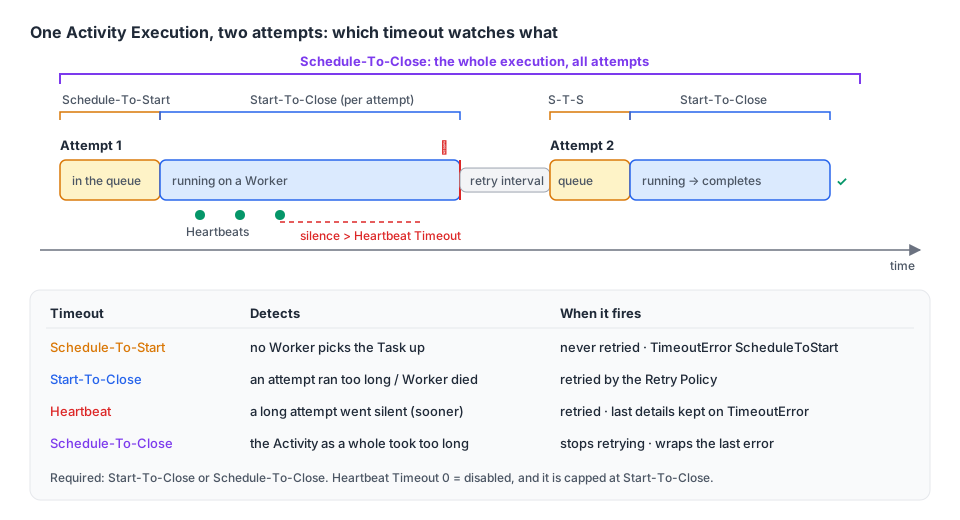
| Timeout | Watches | Scope | Default | When it fires | Go TimeoutType() |
|---|---|---|---|---|---|
| Schedule-To-Start | Task waiting in the queue | Each attempt | ∞ | No retry, ever | TIMEOUT_TYPE_SCHEDULE_TO_START |
| Start-To-Close | One attempt running | Each attempt | none (see below) | Retried per Retry Policy | TIMEOUT_TYPE_START_TO_CLOSE |
| Heartbeat | Gap between two Heartbeats | Each attempt | 0 = disabled | Retried per Retry Policy | TIMEOUT_TYPE_HEARTBEAT |
| Schedule-To-Close | The whole Activity Execution | All attempts | ∞ | Stops retrying | TIMEOUT_TYPE_SCHEDULE_TO_CLOSE |
You must set Start-To-Close or Schedule-To-Close (or both). Set Start-To-Close always: it is the only way the Service finds out that a Worker died in the middle of an attempt.
3. Start-To-Close: "this attempt is taking too long"
Start-To-Close bounds a single attempt. When it expires, the Service records the attempt as timed out and, if the Retry Policy allows, schedules another one. Set it a little above the longest normal run of one attempt, not the average one.
If you set neither Start-To-Close nor Schedule-To-Close, the Activity is rejected. In a Workflow, nothing is returned to your code. On a dev server (Server 1.32.0), the Workflow Task failed with:
BadScheduleActivityAttributes: a valid StartToCloseTimeout or ScheduleToCloseTimeout must be set on the activity.That Task is retried until the code is fixed, and the Workflow stays Running without progress (chapter 03). If you set only Schedule-To-Close, the Service uses it as the Start-To-Close too.
4. Schedule-To-Close: "give up on this Activity"
Schedule-To-Close bounds all attempts together, from the first scheduling to the end. It is the cleanest way to say "keep retrying for at most 15 minutes" (chapter 07).
The Service gives up before the deadline when the next retry can't fit. With Schedule-To-Close = 3s and a 500ms retry interval, on a dev server, the Workflow got:
activity error (…): Not enough time to schedule next retry before activity ScheduleToClose timeout,
giving up retrying (type: ScheduleToClose): gateway 503
The TimeoutError wraps the last attempt's error (gateway 503). errors.As still finds it, so you can tell "timed out while the gateway kept answering 503" from "timed out while running".
Don't rely on the TimeoutError alone. When retries are cut short by a timeout, the chain doesn't always contain one: if the Workflow Execution Timeout cuts them, for example, the Workflow sees ActivityError → ApplicationError only. The reliable signal is RetryState() == RETRY_STATE_TIMEOUT on the ActivityError, and checking timeouts before ApplicationError (chapter 02, chapter 05).
5. Schedule-To-Start: "nobody is picking this up"
Schedule-To-Start bounds the time an Activity Task waits in the Task Queue before a Worker takes it. It's enforced per attempt and is never retried: a retry would go back into the same queue that nobody is polling. On a dev server, an Activity sent to a queue without Workers failed after 2s with TimeoutType() = ScheduleToStart and RetryState() = Timeout, after one attempt.
It answers two questions: "has the Worker fleet died?" and "is it too slow to keep up?". Most of the time a metric answers them better: alert on temporal_activity_schedule_to_start_latency instead of failing Activities. Set the timeout only if you have a plan for the failure, for example sending the work to another Task Queue (see the example in section 7).
6. Heartbeat Timeout: "this long attempt has gone quiet"
A long Activity (importing a 2 GB stock file) needs a large Start-To-Close, which means a crash is noticed late. A Heartbeat Timeout fixes that: the Activity calls activity.RecordHeartbeat regularly, and if no Heartbeat arrives within the timeout, the attempt fails.
Rules worth knowing:
| Rule | Detail |
|---|---|
0 means disabled | Not "infinite", not "immediately". An unset Heartbeat Timeout is stored as 0s. |
| Capped at Start-To-Close | A dev server stored HeartbeatTimeout: 1m with StartToCloseTimeout: 10s as 10s on the ActivityTaskScheduled Event. |
| Heartbeats are throttled | The SDK sends at most one every min(0.8 × HeartbeatTimeout, 60s) (or every 30s without a Heartbeat Timeout). Tune with worker.Options.DefaultHeartbeatThrottleInterval / MaxHeartbeatThrottleInterval. The last Heartbeat before a failure is always sent. |
| Cancellation rides on Heartbeats | An Activity that never Heartbeats never learns it was canceled. |
| Details survive the attempt | The next attempt reads them with activity.GetHeartbeatDetails; the Workflow reads the last ones from the TimeoutError. |
Heartbeat only when you can show progress (rows imported, bytes uploaded). A quick API call doesn't need it. Checkpointing patterns are in the Activities guide, chapter 04 and the Workers guide, chapter 10.
7. Handling each timeout in a Workflow
The inventory service imports supplier stock files. The Workflow reacts differently to each timeout:
// file: inventory/activities.go
package inventory

import (
	"context"

	"go.temporal.io/sdk/activity"
)

type StockFile struct {
	SupplierID string
	URL        string
}

// StockStore reads supplier files and writes stock levels.
type StockStore interface {
	CountRows(ctx context.Context, f StockFile) (int, error)
	ImportRow(ctx context.Context, f StockFile, row int) error
}

type Activities struct {
	Store StockStore
}

// ImportStockFile imports one row at a time and heartbeats the last imported row,
// so a retry resumes where the previous attempt stopped.
func (a *Activities) ImportStockFile(ctx context.Context, f StockFile) (int, error) {
	start := 0
	if activity.HasHeartbeatDetails(ctx) {
		var lastRow int
		if err := activity.GetHeartbeatDetails(ctx, &lastRow); err == nil {
			start = lastRow + 1
		}
	}
	total, err := a.Store.CountRows(ctx, f)
	if err != nil {
		return 0, err
	}
	for row := start; row < total; row++ {
		if err := a.Store.ImportRow(ctx, f, row); err != nil {
			return row, err
		}
		activity.RecordHeartbeat(ctx, row)
	}
	return total, nil
}// file: inventory/workflow.go
package inventory
import (
"errors"
"time"
enumspb "go.temporal.io/api/enums/v1"
"go.temporal.io/sdk/temporal"
"go.temporal.io/sdk/workflow"
)
const (
TaskQueue = "inventory-import"
BulkImportQueue = "inventory-import-bulk" // a bigger Worker pool, used as a fallback
)
type ImportResult struct {
Rows int
UsedBulk bool
StalledAtRow int
}
func ImportSupplierStockWorkflow(ctx workflow.Context, f StockFile) (ImportResult, error) {
var a *Activities
logger := workflow.GetLogger(ctx)
importCtx := workflow.WithActivityOptions(ctx, workflow.ActivityOptions{
ScheduleToStartTimeout: 10 * time.Minute, // the regular pool is saturated or down
StartToCloseTimeout: 2 * time.Hour, // the biggest file we've seen took 70 min
HeartbeatTimeout: time.Minute, // detect a dead Worker within a minute
ScheduleToCloseTimeout: 6 * time.Hour, // give up on this file after 6 hours
})
var rows int
err := workflow.ExecuteActivity(importCtx, a.ImportStockFile, f).Get(ctx, &rows)
if err == nil {
return ImportResult{Rows: rows}, nil
}
var timeoutErr *temporal.TimeoutError
if !errors.As(err, &timeoutErr) {
return ImportResult{}, err // an application error: let it fail the Workflow
}
switch timeoutErr.TimeoutType() {
case enumspb.TIMEOUT_TYPE_SCHEDULE_TO_START:
// Nobody picked it up: reroute to the bulk pool once.
logger.Warn("regular import pool not polling, rerouting", "supplier", f.SupplierID)
bulkCtx := workflow.WithActivityOptions(ctx, workflow.ActivityOptions{
TaskQueue: BulkImportQueue,
StartToCloseTimeout: 2 * time.Hour,
HeartbeatTimeout: time.Minute,
})
if err := workflow.ExecuteActivity(bulkCtx, a.ImportStockFile, f).Get(ctx, &rows); err != nil {
return ImportResult{}, err
}
return ImportResult{Rows: rows, UsedBulk: true}, nil
case enumspb.TIMEOUT_TYPE_HEARTBEAT, enumspb.TIMEOUT_TYPE_SCHEDULE_TO_CLOSE:
// Retries are exhausted. Report how far the last attempt got.
var lastRow int
if timeoutErr.HasLastHeartbeatDetails() {
_ = timeoutErr.LastHeartbeatDetails(&lastRow)
}
logger.Error("stock import gave up", "supplier", f.SupplierID, "lastRow", lastRow, "cause", errors.Unwrap(timeoutErr))
return ImportResult{StalledAtRow: lastRow}, temporal.NewNonRetryableApplicationError(
"stock import did not finish", "StockImportStalled", err, lastRow)
default: // START_TO_CLOSE after the last attempt
return ImportResult{}, err
}
}Checked on a dev server (MaximumAttempts: 2):
| Scenario | What the Workflow got |
|---|---|
Activity heartbeats 42, then goes quiet past a 2s Heartbeat Timeout | TimeoutType() = Heartbeat, HasLastHeartbeatDetails() = true, details = 42 |
| Activity runs 5s with a 2s Start-To-Close | TimeoutType() = StartToClose, no details |
| Activity keeps failing, 3s Schedule-To-Close | TimeoutType() = ScheduleToClose, RetryState() = Timeout, unwraps to the last error |
The timeout always arrives inside an ActivityError. errors.As walks through it; you don't need to unwrap by hand (chapter 05).
8. Workflow timeouts
Three timeouts can be set on client.StartWorkflowOptions:
| Timeout | Bounds | Default | When it fires |
|---|---|---|---|
WorkflowExecutionTimeout | The whole Execution, including retries and Continue-As-New | ∞ | Workflow closes as Timed Out |
WorkflowRunTimeout | One Run | = Execution Timeout | The Run closes as Timed Out (a Retry Policy may start a new one) |
WorkflowTaskTimeout | One Workflow Task on a Worker | 10s | The Task is retried, the Workflow stays open |
Prefer a Timer to a Workflow timeout
The Encyclopedia generally advises against Workflow Execution and Run timeouts. When one fires, the Service closes the Workflow without running any of your code: no compensation, no notification, no cleanup. A deadline expressed with a Timer stays inside your Workflow, where you can react to it.
Checked on a dev server: a Workflow sleeping for an hour, with a defer that runs a cleanup Activity on a disconnected context, was started with WorkflowExecutionTimeout: 3s. Its history ends TimerStarted → WorkflowExecutionTimedOut. The cleanup Activity was never scheduled. run.Get returned a TimeoutError whose TimeoutType() is StartToClose, not an "execution" type, so don't rely on the type to tell a Run Timeout from an Execution Timeout.
The same deadline written with a Timer:
// file: checkout/await_payment.go
package checkout

import (
	"time"

	"go.temporal.io/sdk/temporal"
	"go.temporal.io/sdk/workflow"
)

const PaymentConfirmedSignal = "payment-confirmed"

type PaymentConfirmation struct {
	PaymentID string
}

// AwaitBankTransferWorkflow waits up to 3 days for a bank transfer. On expiry it
// releases the reserved stock and emails the customer, which a WorkflowExecutionTimeout
// could never do.
func AwaitBankTransferWorkflow(ctx workflow.Context, orderID string) (string, error) {
	var confirmation PaymentConfirmation
	received := false
	workflow.Go(ctx, func(ctx workflow.Context) {
		workflow.GetSignalChannel(ctx, PaymentConfirmedSignal).Receive(ctx, &confirmation)
		received = true
	})

	ok, err := workflow.AwaitWithTimeout(ctx, 72*time.Hour, func() bool { return received })
	if err != nil {
		return "", err // the Workflow was canceled
	}
	if ok {
		return confirmation.PaymentID, nil
	}

	actCtx := workflow.WithActivityOptions(ctx, workflow.ActivityOptions{StartToCloseTimeout: time.Minute})
	if err := workflow.ExecuteActivity(actCtx, "ReleaseReservedStock", orderID).Get(ctx, nil); err != nil {
		return "", err
	}
	if err := workflow.ExecuteActivity(actCtx, "SendPaymentExpiredEmail", orderID).Get(ctx, nil); err != nil {
		return "", err
	}
	return "", temporal.NewNonRetryableApplicationError("bank transfer not received in time", "PaymentExpired", nil)
}
Keep WorkflowExecutionTimeout as a safety net for Workflows that must never run forever (a Cron or a Workflow with a Retry Policy, for example), set well above any normal duration.
Workflow Task Timeout
The Workflow Task Timeout detects a Worker that died while running a Workflow Task. Leave it at 10s. Raise it only if loading a very large history takes longer. The Service caps it at 120s: on a dev server, --task-timeout 90s was stored as 90s, and 5m was stored as 120s, without an error. The Go SDK's doc comment on ChildWorkflowOptions.WorkflowTaskTimeout still says the maximum is 1 minute.
Spotting Workflows stuck on failing Workflow Tasks
A Workflow whose Tasks keep failing never fails; it just stops moving. The Service can tag such Workflows with the TemporalReportedProblems Search Attribute (shown in the Web UI's Task Failures View). It must be enabled per Namespace in the Dynamic Config. On a default dev server the attribute exists, but no Workflow was tagged. Until it is enabled, alert on Workflow Task failure metrics instead.
9. Key takeaways
- The Service can't see a crash, only silence. Timeouts are the failure detectors.
- Always set Start-To-Close. Without it (and without Schedule-To-Close) the Workflow Task fails and the Workflow stops moving.
- Schedule-To-Close bounds all retries; the Service gives up early when the next retry can't fit, and the
TimeoutErrorwraps the last real error. - Schedule-To-Start is never retried. Prefer the latency metric unless you can reroute.
- Heartbeat Timeout:
0means disabled, it's capped at Start-To-Close, and the Workflow can read the last Heartbeat details from theTimeoutError. - Switch on
TimeoutError.TimeoutType()to react to each case. - Prefer a Timer to a Workflow Execution or Run timeout: a timeout closes the Workflow without running your code. The Workflow Task Timeout is capped at 120s.