06 · Life of a Workflow Execution, step by step
Level: core concept, deep dive · Read time: ~20 min Sources: How Temporal works — End-to-end lifecycle · About Temporal SDKs — How SDKs work with the Temporal Service
1. The problem
"Start a Workflow, it calls an Activity, it returns a result." Behind that sentence, five components exchange about fifteen messages. When you know them, the Event History in the Web UI stops being a wall of names: each Event tells you which step happened and which component did it.
This chapter follows one Workflow Execution with one Activity, from the Client's start request to the Client reading the result. It uses the 15 steps of the Encyclopedia's "How Temporal works" page.
2. The example
A shipping Workflow books a courier for an order. The courier API is flaky: it fails the first two attempts, so we also see what a retry looks like.
// file: shipping/shipping.go
package shipping

import (
	"context"
	"errors"
	"fmt"
	"time"

	"go.temporal.io/sdk/activity"
	"go.temporal.io/sdk/temporal"
	"go.temporal.io/sdk/workflow"
)

const TaskQueue = "shipping"

type BookCourierInput struct {
	OrderID    string
	PostalCode string
	Parcels    int
}

type Booking struct {
	CourierRef string
	PickupAt   time.Time
}

// BookCourierWorkflow runs in a Worker. Each comment refers to the steps below.
func BookCourierWorkflow(ctx workflow.Context, in BookCourierInput) (Booking, error) {
	ctx = workflow.WithActivityOptions(ctx, workflow.ActivityOptions{
		StartToCloseTimeout: 10 * time.Second,
		RetryPolicy:         &temporal.RetryPolicy{InitialInterval: time.Second},
	})

	var booking Booking
	// Steps 5–6: this call does not run BookCourier. It records a ScheduleActivityTask
	// Command, and the Workflow blocks on Get until the result is in the Event History.
	err := workflow.ExecuteActivity(ctx, BookCourier, in).Get(ctx, &booking)
	// Step 13: after replay, execution continues here with the recorded result.
	if err != nil {
		return Booking{}, err
	}
	// Step 14: returning produces a CompleteWorkflowExecution Command.
	return booking, nil
}

// BookCourier runs in a Worker when an Activity Task arrives (steps 9–11).
// It may do I/O: it is not replayed like Workflow code.
func BookCourier(ctx context.Context, in BookCourierInput) (Booking, error) {
	info := activity.GetInfo(ctx)
	if info.Attempt < 3 {
		// Simulate a flaky courier API. The Service retries; no Event is written (step 11).
		return Booking{}, errors.New("courier API: 503 Service Unavailable")
	}
	return Booking{
		CourierRef: fmt.Sprintf("DHL-%s-%d", in.OrderID, in.Parcels),
		PickupAt:   time.Now().Add(24 * time.Hour).Truncate(time.Hour),
	}, nil
}
3. The whole flow on one page
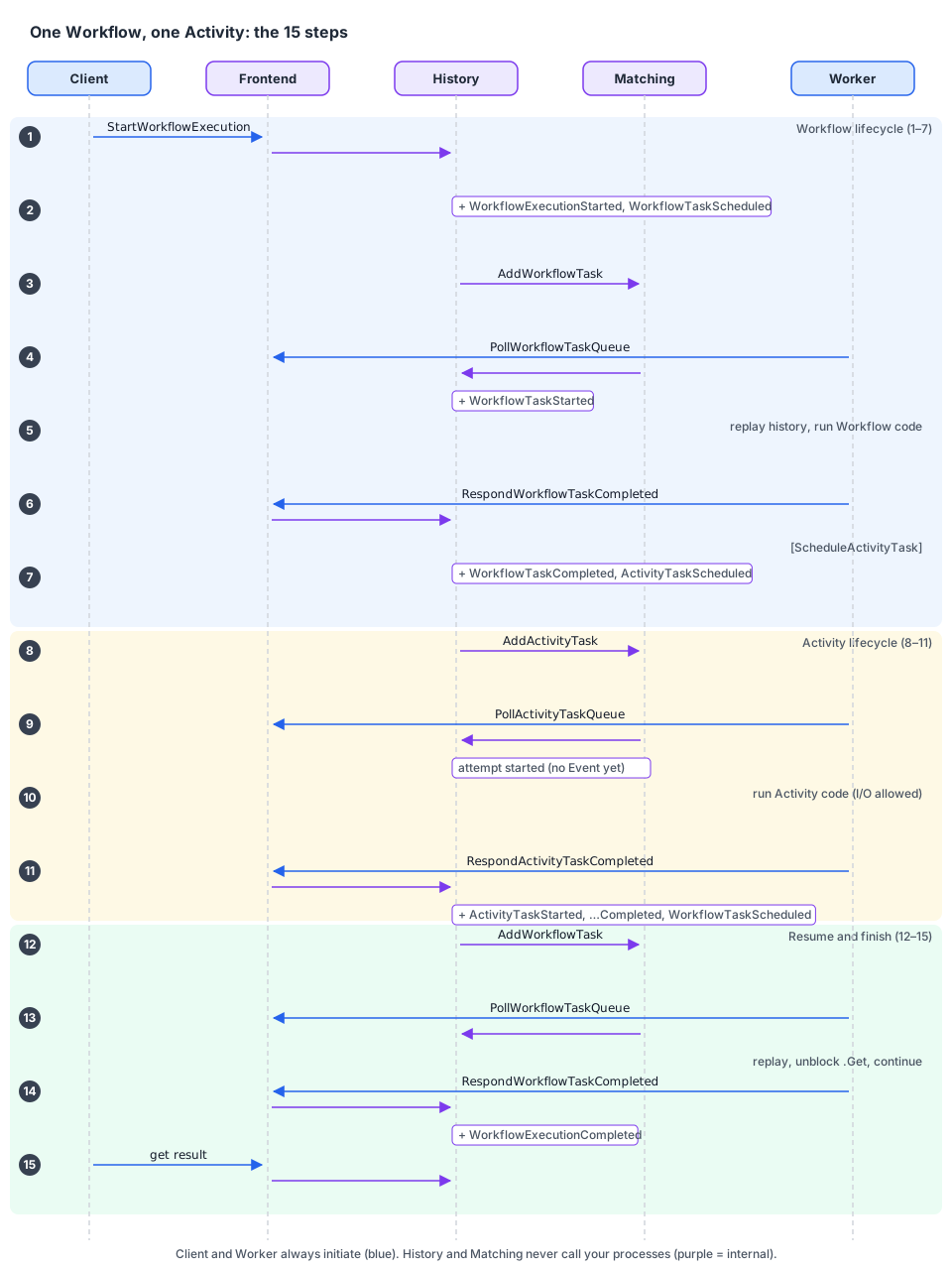
The participants are your Client and your Worker (your environment), and the Frontend, History and Matching services (the Temporal Service). Every request from the Client or the Worker enters through the Frontend. History and Matching never call your processes: the Worker always asks.
4. Workflow lifecycle (steps 1–7)
Step 1. The Client asks Temporal to start a Workflow. Your code calls c.ExecuteWorkflow. The SDK sends StartWorkflowExecution to the Frontend with the Workflow Type (BookCourierWorkflow), the input, and the Task Queue (shipping). The Frontend forwards it to the History Service that owns this Workflow Execution.
Step 2. History creates the Workflow Execution. It writes the execution to the database and starts its Event History with WorkflowExecutionStarted and WorkflowTaskScheduled. It also creates an internal Transfer Task: "put a Workflow Task on Task Queue shipping".
At this point
ExecuteWorkflowhas returned to your Client. No Worker was involved. That's why starting a Workflow succeeds even when all Workers are down.
Step 3. Matching adds a Workflow Task to the Task Queue. A background queue processor in History reads the Transfer Task and calls Matching (AddWorkflowTask). The shipping Task Queue now holds one Workflow Task.
Step 4. A Worker polls and gets the Workflow Task. Your Worker was already long-polling shipping through the Frontend. Matching hands over the Task and tells History it started. History appends WorkflowTaskStarted and returns the Task, with the Event History, to the Worker.
Step 5. The Worker runs your Workflow code. The SDK replays the Event History to rebuild the Workflow's state (here there is nothing to rebuild yet), then runs BookCourierWorkflow until it returns or must wait. Here it must wait at .Get.
Step 6. Your Workflow asks for work via Commands. workflow.ExecuteActivity did not run BookCourier: the SDK recorded a ScheduleActivityTask Command. When the Workflow can't progress, the Worker sends all its Commands in RespondWorkflowTaskCompleted.
Step 7. History turns Commands into Events and new Tasks. For ScheduleActivityTask, History appends WorkflowTaskCompleted then ActivityTaskScheduled, and creates the internal Tasks that will put an Activity Task on a Task Queue. The Workflow is now waiting. It occupies no thread in any Worker until something happens.
5. Activity lifecycle (steps 8–11)
Step 8. Matching puts an Activity Task on the Activity's Task Queue. For each ActivityTaskScheduled Event, History's queue processor calls Matching (AddActivityTask). By default it is the Workflow's Task Queue. ActivityOptions.TaskQueue can send it elsewhere.
Step 9. A Worker polls and starts the Activity. A Worker (possibly a different one) polling that queue receives the Task. History records the started attempt and starts the Activity's timeout timers (e.g. Start-To-Close). It does not append ActivityTaskStarted yet: that Event is written when the Activity completes or fails for the last time.
Step 10. The Worker runs your Activity code. It calls BookCourier with the inputs from the Task. This code can call external services, because it is not replayed like Workflow code.
Step 11. The Activity reports success or failure.
| Outcome | Worker sends | History appends |
|---|---|---|
| Failure, retries left (our attempts 1 and 2) | RespondActivityTaskFailed | Nothing. It schedules the retry, and the Activity Task goes back to the queue after the retry interval |
| Success (our attempt 3) | RespondActivityTaskCompleted + result | ActivityTaskStarted, ActivityTaskCompleted (with the result), WorkflowTaskScheduled |
| Retries exhausted or non-retryable error | RespondActivityTaskFailed | ActivityTaskStarted, ActivityTaskFailed, WorkflowTaskScheduled. The failure goes to the Workflow |
So retries are invisible in the Event History. The only trace is the attempt field on the final ActivityTaskStarted Event (and the pending Activity's attempt count while it is retrying). This keeps histories short even for an Activity that retries for days.
6. The Workflow resumes and finishes (steps 12–15)
Step 12. A new Workflow Task is scheduled. The Activity result (or a Timer firing, a Signal…) made History append Events and a WorkflowTaskScheduled. Its queue processor asks Matching to add the new Workflow Task to shipping.
Step 13. A Worker picks up the next Workflow Task and continues. History appends WorkflowTaskStarted and the Worker receives the updated history. The SDK replays it, unblocks the .Get with the recorded Booking, and the Workflow continues after it.
Step 14. The Workflow closes. The cycle Workflow Task → Commands → Events → new Tasks repeats as many times as needed. When BookCourierWorkflow returns, the Worker sends RespondWorkflowTaskCompleted with a CompleteWorkflowExecution Command. History appends WorkflowTaskCompleted and WorkflowExecutionCompleted and marks the execution closed. A Workflow can also close by failure, cancellation, termination or Continue-As-New. In every case it goes from open to closed and never reopens.
Step 15. The Client reads the result. While the Workflow was open, Clients could Query it and send it Signals. Now that it's closed, run.Get asks the Frontend, which reads the result from History and persistence.
7. See the 15 steps in your own Event History
This program runs a Worker and a Client in the same process (convenient for a demo, not for production), executes the Workflow, then prints its Event History with the step that produced each Event.
// file: cmd/lifecycle-demo/main.go
package main

import (
	"context"
	"log"
	"strconv"

	enumspb "go.temporal.io/api/enums/v1"
	"go.temporal.io/sdk/client"
	"go.temporal.io/sdk/worker"

	"github.com/acme/shop/shipping"
)

// Which lifecycle step writes which Event type.
var stepOf = map[enumspb.EventType]string{
	enumspb.EVENT_TYPE_WORKFLOW_EXECUTION_STARTED:   "step 2  (History creates the execution)",
	enumspb.EVENT_TYPE_WORKFLOW_TASK_SCHEDULED:      "steps 2/11/12 (a Workflow Task is needed)",
	enumspb.EVENT_TYPE_WORKFLOW_TASK_STARTED:        "steps 4/13 (a Worker picked it up)",
	enumspb.EVENT_TYPE_WORKFLOW_TASK_COMPLETED:      "steps 7/14 (Worker sent its Commands)",
	enumspb.EVENT_TYPE_ACTIVITY_TASK_SCHEDULED:      "step 7  (ScheduleActivityTask Command)",
	enumspb.EVENT_TYPE_ACTIVITY_TASK_STARTED:        "step 11 (written late, with the final attempt)",
	enumspb.EVENT_TYPE_ACTIVITY_TASK_COMPLETED:      "step 11 (Activity result recorded)",
	enumspb.EVENT_TYPE_WORKFLOW_EXECUTION_COMPLETED: "step 14 (CompleteWorkflowExecution Command)",
}

func main() {
	c, err := client.Dial(client.Options{})
	if err != nil {
		log.Fatalln("unable to create Temporal client", err)
	}
	defer c.Close()

	// The Worker side: polls "shipping" in the background.
	w := worker.New(c, shipping.TaskQueue, worker.Options{})
	w.RegisterWorkflow(shipping.BookCourierWorkflow)
	w.RegisterActivity(shipping.BookCourier)
	if err := w.Start(); err != nil {
		log.Fatalln("unable to start worker", err)
	}
	defer w.Stop()

	// The Client side: step 1, then step 15.
	ctx := context.Background()
	run, err := c.ExecuteWorkflow(ctx, client.StartWorkflowOptions{
		ID:        "book-courier-ORD-1042",
		TaskQueue: shipping.TaskQueue,
	}, shipping.BookCourierWorkflow, shipping.BookCourierInput{OrderID: "ORD-1042", PostalCode: "69002", Parcels: 2})
	if err != nil {
		log.Fatalln("unable to start workflow", err)
	}
	var booking shipping.Booking
	if err := run.Get(ctx, &booking); err != nil {
		log.Fatalln("workflow failed", err)
	}
	log.Printf("booked %s, pickup %s", booking.CourierRef, booking.PickupAt.Format("Mon 15:04"))

	// Read the Event History back from the History Service.
	iter := c.GetWorkflowHistory(ctx, run.GetID(), run.GetRunID(), false, enumspb.HISTORY_EVENT_FILTER_TYPE_ALL_EVENT)
	for iter.HasNext() {
		ev, err := iter.Next()
		if err != nil {
			log.Fatalln("history read failed", err)
		}
		line := ev.GetEventType().String()
		if attrs := ev.GetActivityTaskStartedEventAttributes(); attrs != nil {
			line += " attempt=" + strconv.Itoa(int(attrs.GetAttempt()))
		}
		log.Printf("%2d  %-52s %s", ev.GetEventId(), line, stepOf[ev.GetEventType()])
	}
}
Output against the dev server (log timestamps removed). The two ERROR lines are the Worker's SDK logging the failed attempts:
ERROR Activity error. … ActivityType BookCourier Attempt 1 Error courier API: 503 Service Unavailable
ERROR Activity error. … ActivityType BookCourier Attempt 2 Error courier API: 503 Service Unavailable
booked DHL-ORD-1042-2, pickup Tue 10:00
 1  WorkflowExecutionStarted                             step 2  (History creates the execution)
 2  WorkflowTaskScheduled                                steps 2/11/12 (a Workflow Task is needed)
 3  WorkflowTaskStarted                                  steps 4/13 (a Worker picked it up)
 4  WorkflowTaskCompleted                                steps 7/14 (Worker sent its Commands)
 5  ActivityTaskScheduled                                step 7  (ScheduleActivityTask Command)
 6  ActivityTaskStarted attempt=3                        step 11 (written late, with the final attempt)
 7  ActivityTaskCompleted                                step 11 (Activity result recorded)
 8  WorkflowTaskScheduled                                steps 2/11/12 (a Workflow Task is needed)
 9  WorkflowTaskStarted                                  steps 4/13 (a Worker picked it up)
10  WorkflowTaskCompleted                                steps 7/14 (Worker sent its Commands)
11  WorkflowExecutionCompleted                           step 14 (CompleteWorkflowExecution Command)
Two failed attempts, three attempts in total, and 11 Events, not 15: attempts 1 and 2 left no Events. Only attempt=3 on Event 6 shows they happened.
8. Reading a "stuck" Workflow with this model
| Last Event in the history | What it means | Check |
|---|---|---|
WorkflowTaskScheduled, nothing after | No Worker picked the Workflow Task (step 4 never happened) | Is a Worker polling this exact Task Queue? Does it register this Workflow Type? |
WorkflowTaskStarted, then WorkflowTaskFailed or timed out, repeating | The Worker can't run the Workflow code (panic, non-determinism error, unregistered type) | Worker logs |
ActivityTaskScheduled, nothing after | The Activity is pending: no Worker on its queue, or it is retrying | temporal workflow describe / UI "Pending Activities": attempt count and last failure |
| A Timer or a Signal wait | The Workflow is waiting by design | Your code |
9. Key takeaways
- Client → Frontend → History creates the execution and a Workflow Task. Matching queues it. A Worker polls it.
- The Worker replays, runs the Workflow code, and returns Commands. History turns Commands into Events and new Tasks.
- Activities are separate Tasks, possibly on other Workers. Retries are scheduled by the Server and write no Events until the last attempt.
- The cycle Workflow Task → Commands → Events → Tasks repeats until the Workflow closes. A closed Workflow never reopens.
- Each Event in the history maps to one step. Use that to debug.