06 · StartWorkflowOptions in practice: timeouts, retries, metadata
Level: daily use, reference · Read time: ~20 min Sources: Go SDK — StartWorkflowOptions reference ·
client.StartWorkflowOptions
1. The problem
ID and TaskQueue get a Workflow running. The other fields of StartWorkflowOptions decide how long it may run, whether it is retried, how you find it later, and what operators see in the Web UI. Most should stay at their defaults. The trick is knowing which ones to change.
2. The fields at a glance
| Field | Default | Use it to… | Section |
|---|---|---|---|
ID | random UUID | Name the execution after the business entity | 04, 05 |
TaskQueue | required | Route to the right Workers | 04 |
WorkflowIDConflictPolicy, WorkflowIDReusePolicy, WorkflowExecutionErrorWhenAlreadyStarted | FAIL, ALLOW_DUPLICATE, false | Handle duplicate starts | 05 |
WorkflowExecutionTimeout | unlimited | Cap the whole execution, across Continue-As-New and retries | 3 |
WorkflowRunTimeout | = execution timeout | Cap a single run | 3 |
WorkflowTaskTimeout | 10 s | Cap one Workflow Task on a Worker | 3 |
RetryPolicy | none: Workflows aren't retried | Retry the whole Workflow on failure | 4 |
Memo | empty | Attach non-indexed notes | 5 |
TypedSearchAttributes (SearchAttributes is deprecated) | empty | Index fields to search and filter Workflows | 5 |
StaticSummary, StaticDetails | empty | Human-readable text in the Web UI | 5 |
StartDelay | 0 | Start the first Workflow Task later | 6 |
Priority | none | Order Tasks within a Task Queue | 6 |
CronSchedule | none | Legacy cron. Prefer Schedules | 6 |
EnableEagerStart, VersioningOverride | off | Latency optimization, Worker Versioning | — |
The Go Client page documents the first eleven rows (in its older form). Everything from WorkflowIDConflictPolicy to VersioningOverride that it doesn't list is in StartWorkflowOptions in SDK v1.50.0.
3. Workflow timeouts
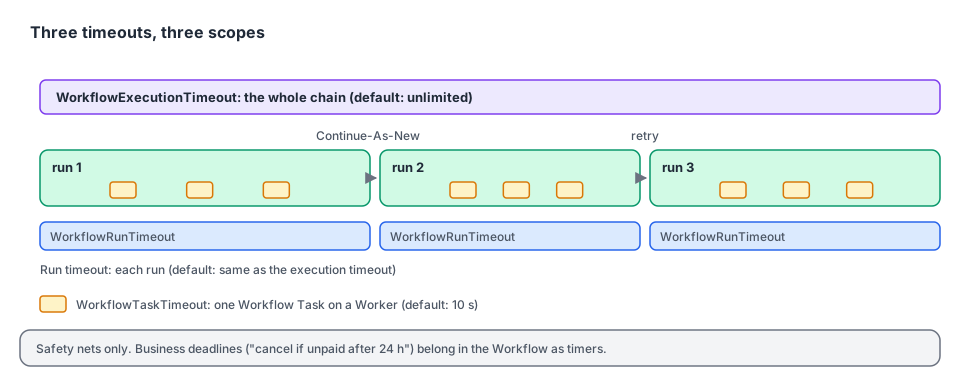
| Timeout | Measures | When it fires |
|---|---|---|
| Execution | From start until the end of the whole chain of runs (Continue-As-New, retries, cron) | The current run times out. No further runs |
| Run | From the start of one run until its end | That run times out. A retry or the next cron run may follow |
| Task | From a Worker picking up a Workflow Task until it responds | The Task is rescheduled. Usually means the Worker is stuck or overloaded |
Timeouts on Workflows are rarely what you want: a Workflow is meant to wait, sometimes for months. Prefer timers inside the Workflow for business deadlines ("cancel the order if not paid within 24 hours"), because the Workflow can react to a timer and clean up. A Workflow timeout just ends it, and no code runs after that. Use timeouts as safety nets against runaway executions.
// file: onboarding/start.go
package onboarding

import (
	"context"
	"time"

	"go.temporal.io/sdk/client"
)

const TaskQueue = "onboarding"

type OnboardMerchantInput struct {
	MerchantID string
	Country    string
	Tier       string // "standard", "enterprise"
}

// StartOnboarding sets safety-net timeouts. Business deadlines live inside the Workflow as timers.
func StartOnboarding(ctx context.Context, c client.Client, in OnboardMerchantInput) (client.WorkflowRun, error) {
	return c.ExecuteWorkflow(ctx, client.StartWorkflowOptions{
		ID:        "onboard-" + in.MerchantID,
		TaskQueue: TaskQueue,
		// Never let an onboarding live longer than 90 days, whatever happens.
		WorkflowExecutionTimeout: 90 * 24 * time.Hour,
		// WorkflowRunTimeout defaults to the execution timeout. WorkflowTaskTimeout stays at 10s.
	}, "OnboardMerchantWorkflow", in)
}
4. Retrying a whole Workflow
Activities are retried by default. Workflows are not: if a Workflow returns an error, it fails. A RetryPolicy on StartWorkflowOptions makes the Service start a new run of the same Workflow ID after a failure.
// file: imports/start.go
package imports

import (
	"context"
	"time"

	"go.temporal.io/sdk/client"
	"go.temporal.io/sdk/temporal"
)

// StartSupplierFeedImport retries the whole import from scratch if it fails,
// e.g. because the supplier's file was half-uploaded.
func StartSupplierFeedImport(ctx context.Context, c client.Client, supplierID, feedURL string) (client.WorkflowRun, error) {
	return c.ExecuteWorkflow(ctx, client.StartWorkflowOptions{
		ID:        "feed-import-" + supplierID,
		TaskQueue: "imports",
		RetryPolicy: &temporal.RetryPolicy{
			InitialInterval:        time.Minute,
			BackoffCoefficient:     2.0,
			MaximumInterval:        30 * time.Minute,
			MaximumAttempts:        5,
			NonRetryableErrorTypes: []string{"InvalidFeedFormat"},
		},
		WorkflowExecutionTimeout: 6 * time.Hour, // caps all 5 attempts together
	}, "ImportSupplierFeedWorkflow", supplierID, feedURL)
}
Use this sparingly. Retrying individual Activities is almost always better: completed steps aren't redone. A Workflow retry restarts from the beginning, with a new Run ID.
5. Finding and explaining Workflows: Memo, Search Attributes, summaries
| Memo | Search Attributes | Static summary / details | |
|---|---|---|---|
Indexed (usable in ListWorkflow queries)? | No | Yes | No |
Shown in DescribeWorkflowExecution / UI | Yes | Yes | Yes, as the Workflow's title and description |
| Typed? | Any serializable value | Typed keys: Keyword, Text, Int, Double, Bool, Datetime, KeywordList | Strings (Markdown for details) |
| Must be registered first? | No | Yes, on the Namespace | No |
Search Attribute types map to Go types: Keyword and Text → string, Int → int64, Double → float64, Bool → bool, Datetime → time.Time, KeywordList → []string.
Register custom Search Attributes once per Namespace:
temporal operator search-attribute create --name CustomerTier --type Keyword
temporal operator search-attribute create --name OrderTotalCents --type Int
# or, for the dev server: temporal server start-dev --search-attribute CustomerTier=Keyword --search-attribute OrderTotalCents=Int
Then set them with typed keys. The untyped SearchAttributes map[string]any field still works but is deprecated in the Go SDK.
// file: orders/search.go
package orders

import (
	"context"
	"fmt"

	"go.temporal.io/sdk/client"
	"go.temporal.io/sdk/temporal"
)

const TaskQueue = "orders"

// Typed keys, declared once and shared by the code that writes and the code that queries.
var (
	CustomerTierKey    = temporal.NewSearchAttributeKeyKeyword("CustomerTier")
	OrderTotalCentsKey = temporal.NewSearchAttributeKeyInt64("OrderTotalCents")
)

type PlaceOrderInput struct {
	OrderID      string
	CustomerID   string
	CustomerTier string
	AmountCents  int64
}

func StartOrder(ctx context.Context, c client.Client, in PlaceOrderInput) (client.WorkflowRun, error) {
	return c.ExecuteWorkflow(ctx, client.StartWorkflowOptions{
		ID:        "order-" + in.OrderID,
		TaskQueue: TaskQueue,
		TypedSearchAttributes: temporal.NewSearchAttributes(
			CustomerTierKey.ValueSet(in.CustomerTier),
			OrderTotalCentsKey.ValueSet(in.AmountCents),
		),
		Memo: map[string]any{
			"placedFrom": "mobile-app/4.12.0", // context for humans, not searchable
		},
		StaticSummary: fmt.Sprintf("Order %s (%s)", in.OrderID, in.CustomerTier),
		StaticDetails: fmt.Sprintf("**Customer:** %s  \n**Total:** %.2f EUR", in.CustomerID, float64(in.AmountCents)/100),
	}, "PlaceOrderWorkflow", in)
}

// BigGoldOrdersQuery finds running high-value orders from gold customers.
const BigGoldOrdersQuery = "WorkflowType = 'PlaceOrderWorkflow' AND ExecutionStatus = 'Running' " +
	"AND CustomerTier = 'gold' AND OrderTotalCents > 100000"
6. When and how it runs: StartDelay, Priority, CronSchedule
// file: marketing/start.go
package marketing

import (
	"context"
	"time"

	"go.temporal.io/sdk/client"
	"go.temporal.io/sdk/temporal"
)

// StartAbandonedCartReminder starts now (so the ID is reserved and the Workflow can be
// Signaled or cancelled), but its first Workflow Task only runs in 2 hours.
func StartAbandonedCartReminder(ctx context.Context, c client.Client, cartID string) (client.WorkflowRun, error) {
	return c.ExecuteWorkflow(ctx, client.StartWorkflowOptions{
		ID:         "cart-reminder-" + cartID,
		TaskQueue:  "marketing",
		StartDelay: 2 * time.Hour,
		// Lower number = higher priority. Reminders yield to transactional work on shared queues.
		Priority: temporal.Priority{PriorityKey: 5},
	}, "AbandonedCartReminderWorkflow", cartID)
}| Option | Notes |
|---|---|
StartDelay | The execution exists right away (visible, deduplicated by ID). The first Workflow Task waits for the delay. A Signal-With-Start during the delay ends the wait. A plain Signal is recorded but doesn't. |
Priority | PriorityKey from 1 (highest) to 5 by default. Unset means 3. Tasks with a lower key are dispatched first within a Task Queue. Also has fairness fields (FairnessKey, FairnessWeight). |
CronSchedule | Still supported ("15 8 * * *", UTC). Each run starts after the previous one ends, and a missed slot is skipped. For new code, prefer Schedules (c.ScheduleClient()), which can be paused, backfilled and inspected. See the Workflows guide, chapter 10. |
A cron Workflow can read the previous run's result with workflow.HasLastCompletionResult and workflow.GetLastCompletionResult. See chapter 07.
7. Key takeaways
- Only
TaskQueueis required. Most other fields should stay at their defaults. - Workflow timeouts are safety nets: execution (whole chain) ⊇ run (one run) ⊇ task (one Workflow Task). Model business deadlines as timers.
- Workflows aren't retried by default. A
RetryPolicyrestarts the whole Workflow, so prefer Activity retries. - Search Attributes are indexed and typed: register them, then use
TypedSearchAttributes. Memo and static summary/details are for humans. StartDelaydefers the first Task,Priorityorders Tasks, and Schedules replaceCronSchedule.