10 · Activity Operations: Pause, Unpause, Reset, Update Options, Cancel, Terminate, Delete
Level: operations · Read time: ~20 min Sources: Activity Operations · Pause · Unpause · Reset · Update Options · Request Cancel · Terminate · Delete
1. The problem
Retries and timeouts are automatic. Sometimes a human has to step in:
- a downstream API is down and 5,000 Activities are retrying against it, so you want to stop the retries until it recovers
- you fixed a bug and deployed. An Activity has used 9 of its 10 attempts, so you want to give it a fresh set
- the Schedule-To-Close Timeout is about to expire on a job that can still succeed, so you want to extend it without restarting
- a Standalone job was submitted with bad input, so you want to stop it now
Activity Operations are deliberate actions on a specific Activity Execution, as opposed to the lifecycle behaviors (retries, timeouts) that happen on their own.
- Where: the CLI (
temporal activity ...), the Web UI, or the gRPC API. - Not in Workflow or Activity code. They are operational controls, not programming APIs.
- Apply to: Workflow Activities and Standalone Activities. Not Local Activities.
| Release stage | Operations | Versions |
|---|---|---|
| Public Preview | Pause, Unpause, Reset, Update Options | Workflow Activities: Server ≥ 1.28.0 (self-hosted UI ≥ 2.47.0). Standalone: Server ≥ 1.32.0, CLI ≥ 1.9.1 |
| GA (Standalone) | Request Cancel, Terminate, Delete | Server ≥ 1.32.0, CLI ≥ 1.9.1 |
2. The operations at a glance
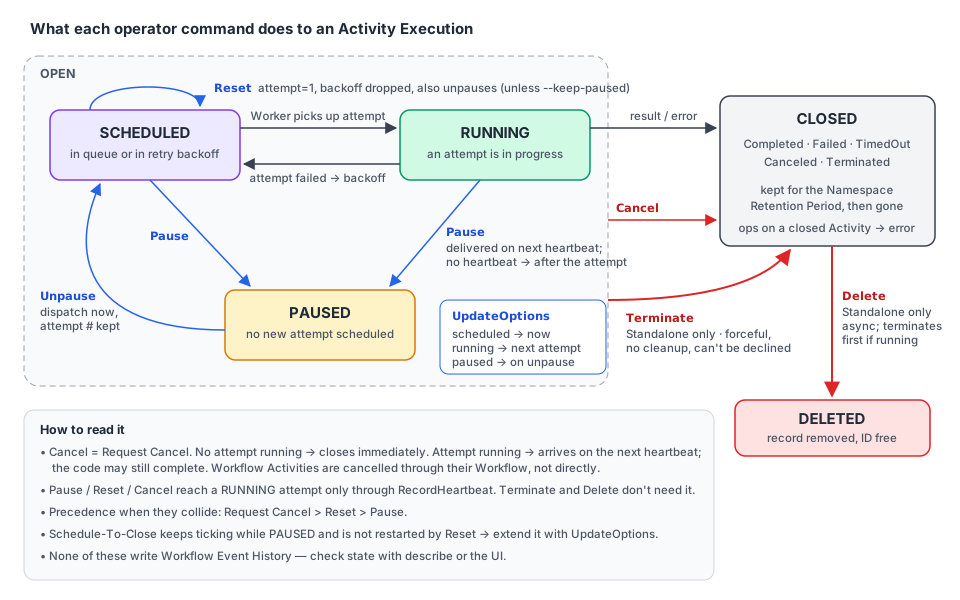
| Operation | What it does | Workflow Activity | Standalone Activity | CLI |
|---|---|---|---|---|
| Pause | Stops retries. The running attempt continues unless the Activity heartbeats | ✅ | ✅ | temporal activity pause |
| Unpause | Resumes a Paused Activity. The next attempt starts immediately | ✅ | ✅ | temporal activity unpause |
| Reset | Clears retry state (attempts, backoff) and schedules a new attempt | ✅ | ✅ | temporal activity reset |
| Update Options | Changes timeouts, Retry Policy or Task Queue without restarting | ✅ | ✅ | temporal activity update-options |
| Request Cancel | Asks the Execution to close gracefully so your code can clean up | through the Workflow | ✅ | temporal activity cancel |
| Terminate | Closes the Execution now, no cleanup | ❌ | ✅ | temporal activity terminate |
| Delete | Terminates if running, then deletes the record asynchronously | ❌ | ✅ | temporal activity delete |
CLI convention: add
--workflow-id <id>to target a Workflow Activity. Omit it to target a Standalone Activity.
What a successful call really means
Every operation does two things, and each can succeed without the other:
- The server-side state changes immediately. Terminate closes the Execution. Request Cancel closes it right away if no attempt is running. This part doesn't depend on heartbeats.
- Interrupting a running attempt is best-effort. Request Cancel, Terminate, Reset and Pause all try to reach your code through the heartbeat response. An Activity that doesn't heartbeat isn't interrupted mid-attempt.
So a successful Request Cancel, Reset or Pause means "accepted", not "stopped". A running attempt may still complete, or fail non-retryably, instead of honoring the request. Only Terminate and Delete always discard progress.
3. Pause
When: a dependency is down and you want retries to stop until it recovers. You also need to inspect or change config before the next retry, or hold specific Activities during a Worker rollout.
What happens:
- No further retries are scheduled. The Service enforces this, not the SDK.
- The parent Workflow is unaffected. It keeps running, and Signals, Queries and Updates still work.
- The Workflow can't see it. No Event History event is written.
- What happens to the running attempt depends on heartbeats:
- with heartbeats: it is interrupted on its next heartbeat with a Pause-specific error, so it can clean up and exit
- without heartbeats: it runs to the end. On success the result goes to the Workflow normally. On failure no retry is scheduled.
- Pause is idempotent. Pausing a completed Activity returns an error.
temporal activity pause \
  --workflow-id order-fulfillment-ORD-1042 \
  --activity-id charge-ORD-1042 \
  --reason "Payment provider outage INC-2231, pausing until recovery"
⚠️ A Paused Activity can still time out. Pause doesn't stop or extend Schedule-To-Close. There's no batch Pause (no --query), so you issue one command per Activity ID. And there is no Namespace-wide query for Paused Workflow Activities, so you must know the Workflow ID. Inside a Workflow, the TemporalPauseInfo Search Attribute can be filtered on.
Workflow Pause vs Activity Pause: they are independent. Both stop Activity retries, but only Activity Pause interrupts a running attempt through its heartbeat. If both are active, both must be Unpaused.
4. Unpause
When: the dependency recovered, the deploy or config change is done, or the investigation is over.
What happens: the Activity is rescheduled immediately, and any remaining backoff is dropped. The attempt count, heartbeat details and timeouts are kept. Use Reset to start again from attempt 1. Unpause is idempotent. Unpausing a completed Activity returns an error.
temporal activity unpause --workflow-id order-fulfillment-ORD-1042 --activity-id charge-ORD-1042⚠️ Unpausing many Activities at once sends all their retries at the same moment. Unpause in batches, or use --jitter with --query on Workflow Activities. An Activity without heartbeats that is still running when you Unpause keeps running. No concurrent attempt is started.
5. Reset
When: you want to give an Activity a fresh set of retries after fixing the root cause, start a Paused Activity clean after a deploy, skip a long backoff and retry now, or restart a batch of failures with jitter.
What happens:
| Aspect | After Reset |
|---|---|
| Attempt count | Back to 1, a full set of retries |
| Retry backoff | Dropped: if waiting, the new attempt is dispatched immediately |
| Heartbeat details | Kept (the next attempt can resume from the checkpoint). Use --clear-heartbeat-details to drop them |
| Per-attempt timeouts | Re-armed for the new attempt |
| Schedule-To-Close | Not restarted: still measured from the original schedule time |
| Paused? | Reset also Unpauses, unless you pass --keep-paused |
| Parent Workflow | Unaffected, and it can't see the Reset (no history event) |
If an attempt is running, Reset is cooperative: it is delivered through the heartbeat, and the Worker may stop the attempt or finish it. The Service applies the reset once the attempt ends, including by Start-To-Close. Reset never runs two attempts at once.
temporal activity reset --workflow-id order-fulfillment-ORD-1042 --activity-id charge-ORD-1042
temporal activity reset --workflow-id order-fulfillment-ORD-1042 --activity-id charge-ORD-1042 --keep-paused
temporal activity reset --activity-id export-CUST-4821     # Standalone
⚠️ Bulk Reset with --query can overwhelm a recovering service, so add --jitter. --restore-original-options reverts timeouts, Retry Policy and Task Queue to the values set when the Activity was first scheduled.
6. Update Options
When: Schedule-To-Close is about to expire on a Paused Activity, the Retry Policy needs tuning (longer backoff, more attempts), or you want to move the Activity to another Task Queue (other Workers), or restore its original config.
What you can change: timeouts (Schedule-To-Close, Start-To-Close, Schedule-To-Start, Heartbeat), the Retry Policy (initial interval, max interval, backoff coefficient, max attempts) and the Task Queue. Only the fields you pass are changed.
| Activity state | When the new options apply |
|---|---|
| Waiting for a retry | Immediately: the pending retry timer is recomputed |
| Running | Next attempt: the running one isn't interrupted |
| Paused | When it is Unpaused and the next attempt starts |
temporal activity update-options \
  --workflow-id order-fulfillment-ORD-1042 \
  --activity-id charge-ORD-1042 \
  --schedule-to-close-timeout 24h
⚠️ --restore-original-options works only with --query (it is silently ignored for a single Workflow) and can't be combined with other changes. It needs a stored snapshot, so Activities that started before your Service supported Activity Operations are rejected.
7. Request Cancel (Standalone directly; Workflow Activities through their Workflow)
When: a Standalone job is no longer needed, or was submitted by mistake, and you want it to stop at a safe point and release its resources.
What happens: the Execution moves to CancelRequested.
- No attempt running: it closes immediately, heartbeat or not.
- Attempt running: the cancellation is raised in your code at the next heartbeat response. The Activity ends as canceled if your code lets the error propagate.
- No heartbeat: it takes effect at the next attempt boundary, for example when Start-To-Close elapses.
temporal activity cancel --activity-id export-CUST-4821 --reason "No longer needed"Cancellation can be requested only once, and it takes precedence over Reset and Pause.
8. Terminate (Standalone only)
When: a Standalone job is stuck or misbehaving and must close now, heartbeat or not, or a Request Cancel was ignored.
What happens: the Execution closes immediately and discards progress. Your code can't see or decline it: no cleanup runs and no cancellation error is raised. The record stays queryable until the Retention Period ends.
temporal activity terminate --activity-id export-CUST-4821 --reason "Bad input"9. Delete (Standalone only)
When: you must remove an Execution and its result before retention ends, or free its Activity ID for reuse now.
What happens: if it's running, it is first terminated (same semantics as above). The record is then removed asynchronously, so it can stay visible briefly. Delete is irreversible: the inputs and result are gone.
temporal activity delete --activity-id export-CUST-482110. When operations collide, and how timers behave
- Precedence: Request Cancel > Reset > Pause. A higher-precedence request wins over a pending lower one.
- A request that doesn't fit the current state returns an error instead of being queued:
FailedPrecondition(wrong state) orNotFound. - Timers keep running while Paused, including Schedule-To-Close.
- No new attempt is scheduled while Paused. On Unpause, a retry that is already due starts immediately.
- Before the first attempt, Unpause respects the original Start Delay deadline. If that deadline already passed, the Activity is dispatched immediately.
11. Batch operations
Use --query (a List Filter) instead of a single ID:
- Standalone Activities: batch Request Cancel, Terminate, Delete
- Workflow Activities:
--queryworks with Reset, Unpause, Update Options --jitterspreads the batch out so a recovering downstream isn't hit all at once
temporal activity terminate \
  --query 'ActivityType="ProcessImage" AND ExecutionStatus="Running"' \
  --reason "Bad input batch"
12. Observability and audit
- Operations don't write Event History events. Nothing that reads history (Workflow code, Replay, external tools) can tell an operation happened. Once the Activity completes or the Workflow closes, the evidence is gone.
- To see the current state, use
temporal workflow describe: it shows each pending Activity's Paused flag, attempt and last failure. The UI shows who did what, when, and why (if--reasonwas given). - Temporal Cloud billing: Pause, Reset and Update Options each count as one Action. Unpause is free.
13. Go: making your Activity "operations-friendly"
Operations reach running code only through heartbeats. A well-behaved long-running Activity therefore:
- heartbeats regularly (and saves a checkpoint in the details), and
- when
ctx.Done()fires, usescontext.Cause(ctx)to tell Pause, Reset and Cancel apart (Go SDK v1.34.0+).
| Cause | Meaning | Typical handling |
|---|---|---|
activity.ErrActivityPaused | Paused, will resume later | Release expensive resources and keep the checkpoint |
activity.ErrActivityReset | The next attempt restarts at attempt 1 | Save partial progress if you want, then exit |
| anything else | Real cancellation, timeout, or the Workflow closed | Undo partial work and exit |
// file: marketplace/activities.go
package marketplace

import (
	"context"
	"errors"
	"time"

	"go.temporal.io/sdk/activity"
)

type SyncListingsInput struct {
	SellerID string
	SKUs     []string
}

type MarketplaceAPI interface {
	UpsertListing(ctx context.Context, sellerID, sku string) error
	OpenSession(ctx context.Context, sellerID string) (sessionID string, err error)
	CloseSession(ctx context.Context, sessionID string) error
}

type MarketplaceActivities struct {
	API MarketplaceAPI
}

// SyncListingsToMarketplace pushes thousands of listings. Ops may Pause it during a
// marketplace outage, or Reset it after a fix.
func (a *MarketplaceActivities) SyncListingsToMarketplace(ctx context.Context, in SyncListingsInput) (int, error) {
	next := 0
	if activity.HasHeartbeatDetails(ctx) {
		_ = activity.GetHeartbeatDetails(ctx, &next) // kept across Pause/Unpause and Reset
	}

	session, err := a.API.OpenSession(ctx, in.SellerID)
	if err != nil {
		return 0, err
	}
	defer func() {
		closeCtx, cancel := context.WithTimeout(context.Background(), 5*time.Second)
		defer cancel()
		_ = a.API.CloseSession(closeCtx, session) // the Activity ctx may already be cancelled
	}()

	for i := next; i < len(in.SKUs); i++ {
		if ctx.Err() != nil {
			return i, interrupted(ctx, i)
		}
		if err := a.API.UpsertListing(ctx, in.SellerID, in.SKUs[i]); err != nil {
			if ctx.Err() != nil {
				return i, interrupted(ctx, i) // the upsert was cut short: don't checkpoint it
			}
			return i, err
		}
		activity.RecordHeartbeat(ctx, i+1) // checkpoint + delivery channel for operations
	}
	return len(in.SKUs), nil
}

// interrupted logs why the Activity context was cancelled and returns ctx.Err().
func interrupted(ctx context.Context, next int) error {
	logger := activity.GetLogger(ctx)
	switch cause := context.Cause(ctx); {
	case errors.Is(cause, activity.ErrActivityPaused):
		logger.Info("Paused by operator; will resume from checkpoint", "next", next)
	case errors.Is(cause, activity.ErrActivityReset):
		logger.Info("Reset by operator; next attempt restarts at attempt 1", "next", next)
	default:
		logger.Info("Cancelled", "cause", cause)
	}
	return ctx.Err()
}
Bonus: experimental handle methods for Standalone Activities
The Encyclopedia describes operator commands as CLI, UI and gRPC only. Recent Go SDK releases (seen in v1.50.0) also expose experimental methods on a Standalone client.ActivityHandle: Pause, Unpause (with Jitter), UpdateOptions and RestoreOriginalOptions. Use them for internal ops tooling, not in business code, and expect the API to change:
// file: marketplace/ops_tooling.go
package marketplace

import (
	"context"
	"time"

	"go.temporal.io/sdk/client"
)

// ExtendAndResume is an ops-tool helper: give a paused Standalone job 24h more, then resume it.
func ExtendAndResume(ctx context.Context, c client.Client, activityID string) error {
	h := c.GetActivityHandle(client.GetActivityHandleOptions{ActivityID: activityID})

	newDeadline := 24 * time.Hour
	if _, err := h.UpdateOptions(ctx, client.ActivityOptionsUpdate{
		ScheduleToCloseTimeout: &client.ActivityOptionChange[time.Duration]{Value: &newDeadline},
	}); err != nil {
		return err
	}
	return h.Unpause(ctx, client.UnpauseActivityOptions{
		Reason: "marketplace API recovered",
		Jitter: 30 * time.Second,
	})
}
14. Runbook: "the payment provider is down"
- Pause the affected Activities (one per ID):
temporal activity pause --workflow-id … --activity-id … --reason "INC-2231". - Watch
temporal workflow describe. Paused Activities still count down Schedule-To-Close, so if the outage is long, update-options to extend it. - When the provider recovers, either Unpause (keeps the attempt count) or Reset (fresh attempts). Use
--query+--jitterfor Workflow Activities. - For Standalone jobs that are truly obsolete: Request Cancel, then Terminate if they ignore it, then Delete if you need the IDs back.
Key takeaways
- Operations are operator tools (CLI, UI, gRPC). They are not in your Workflow or Activity code, and Workflow code can't see them.
- Server-side state changes immediately. Interrupting a running attempt needs heartbeats.
- Pause stops retries, Unpause resumes now, Reset gives fresh attempts, Update Options changes config for the next attempt.
- Request Cancel / Terminate / Delete act directly on Standalone Activities only. A Workflow Activity is cancelled through its Workflow.
- Precedence: Cancel > Reset > Pause. Schedule-To-Close keeps running while Paused and after Reset.
- In Go, detect Pause and Reset with
context.Cause(ctx)andactivity.ErrActivityPaused/activity.ErrActivityReset.
⬅️ Previous: 09 · Dynamic Activities · 🏁 Back to the roadmap