09 · Continue-As-New: Workflows that run forever
Level: core concept for long-running Workflows · Read time: ~15 min Sources: Encyclopedia — Continue-As-New · Encyclopedia — Event History limits · Encyclopedia — Workflow Execution limits · Encyclopedia — Workflow Execution Chain · Go SDK — Continue-As-New · Go SDK — Message passing · Encyclopedia — Schedule (Last completion result)
1. The problem
Some Workflows never really finish. They represent a thing rather than a process:
- a customer's loyalty account that earns and spends points for years
- a subscription that renews every month
- a device twin that receives telemetry Signals
These are often called Entity Workflows. There is no time limit on a Workflow Execution, but every Activity, Timer and Signal adds events to the Event History, and that history has hard limits:
| Limit | Warning | Hard limit (Execution is terminated) |
|---|---|---|
| Events in the history | 10,240 events | 51,200 events |
| History size | 10 MB | 50 MB |
| Updates in the history | — | 2,000 Updates |
| Signals in the history | — | 10,000 Signals |
A very long history is also slow to replay (chapter 03). And a Workflow that started on old code keeps running old code paths for years, which makes versioning harder (chapter 11).
Continue-As-New solves this. The Workflow checkpoints its state, closes the current Run, and atomically starts a new Run with the same Workflow ID, a new Run ID, a fresh, empty Event History, and the checkpointed state as its input. Repeat as often as needed, and your Workflow runs forever.
2. How it works
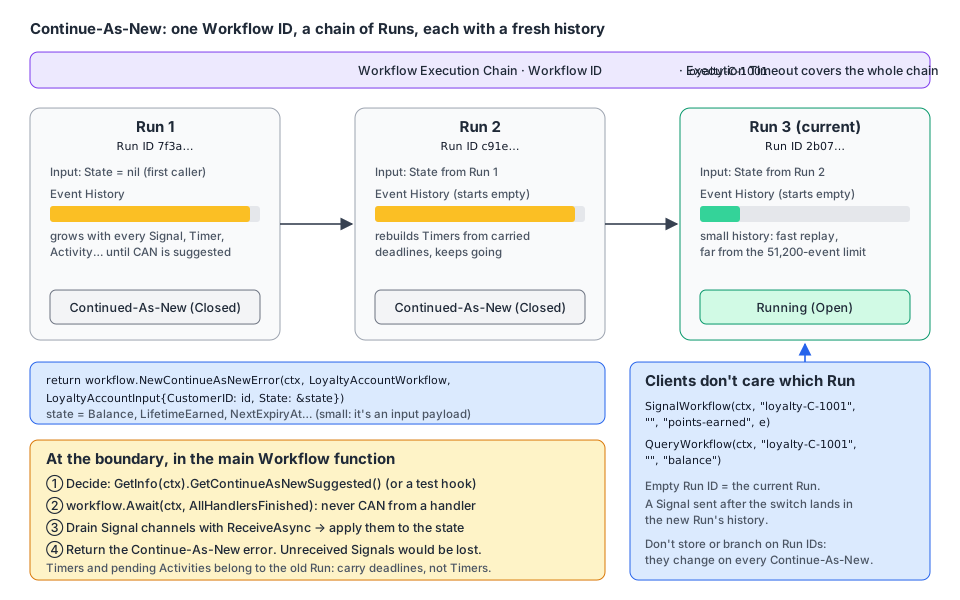
- The current Run closes with status Continued-As-New (a Closed status, like Completed).
- The next Run is part of the same Workflow Execution Chain. It keeps the Workflow ID, gets a new Run ID, and starts its own Event History.
- The state you pass is just the Workflow's input arguments. The original caller usually leaves the state fields empty (
nil), and later Runs receive the state from the previous Run. - Clients that use the Workflow ID without a Run ID (Signals, Queries, Updates, cancel) automatically reach the current Run. That's one reason not to rely on Run IDs in your logic.
workflow.GetInfo(ctx).ContinuedExecutionRunIDgives the previous Run ID, andFirstRunIDthe first Run of the chain.- The Workflow Execution Timeout applies to the whole chain. The Workflow Run Timeout applies to one Run.
Interactions to remember
| Feature | What happens across Continue-As-New |
|---|---|
| Start Delay | Applies only to the initial Execution. Not reapplied to the next Run. |
| Schedules | If a scheduled Run continues-as-new, LastCompletionResult isn't accessible in the new Run, and that Run's status is Continued-As-New, not Completed. |
| Pending Timers / Activities | They belong to the old Run. Carry what you need (e.g. a deadline) in the state and recreate it. |
| Signals not yet received | Lost with the old Run unless you drain the channel before returning. |
| In-flight Update / Signal handlers | Must finish first. Never continue-as-new from inside a handler. |
3. How to Continue-As-New in Go
Return the error built by workflow.NewContinueAsNewError from your main Workflow function. It stops the Run right away and starts the next one.
return workflow.NewContinueAsNewError(ctx, LoyaltyAccountWorkflow, LoyaltyAccountInput{...})ctxcan override options for the next Run, such as the Task Queue (workflow.WithWorkflowTaskQueue) or the Run Timeout. If you don't, the next Run uses the current Run's options.wfnis the Workflow to run next. It's usually the same function, but it can be a different one.workflow.NewContinueAsNewErrorWithOptions(ctx, workflow.ContinueAsNewErrorOptions{…}, wfn, args...)also lets you set aRetryPolicyfor the next Run (default: the current one is carried over), aBackoffStartInterval(delay before the next Run's first Workflow Task), and anInitialVersioningBehavior(experimental, for Worker Versioning).
When to Continue-As-New
Temporal tracks your history against the limits and tells you when it's time:
| Go API | Meaning |
|---|---|
workflow.GetInfo(ctx).GetContinueAsNewSuggested() | true when the Service suggests continuing-as-new |
workflow.GetInfo(ctx).GetContinueAsNewSuggestedReasons() | why: ContinueAsNewSuggestedReasonTooManyHistoryEvents, …HistorySizeTooLarge, …TooManyUpdates |
workflow.GetInfo(ctx).GetCurrentHistoryLength() / GetCurrentHistorySize() | the current event count and size in bytes, for your own thresholds |
Check them at points where your state is consistent and easy to checkpoint, typically at the top or bottom of your main loop. You may also want to Continue-As-New periodically, depending on how often you deploy, so that only a couple of code versions are ever running.
4. Example: a loyalty account that lives for years
LoyaltyAccountWorkflow has the Workflow ID loyalty-<customerID>. It:
- receives
points-earnedandredeem-pointsSignals forever - answers a
balanceQuery - runs a yearly expiry Timer that resets unused points
- continues-as-new when Temporal suggests it, carrying
LoyaltyAccountState
Types and Activities
// file: loyalty/types.go
package loyalty

import "time"

const (
	TaskQueue          = "loyalty"
	PointsEarnedSignal = "points-earned"
	RedeemPointsSignal = "redeem-points"
	BalanceQuery       = "balance"
	PointsLifetime     = 365 * 24 * time.Hour
)

func WorkflowID(customerID string) string { return "loyalty-" + customerID }

type PointsEarned struct {
	TxID    string
	Points  int64
	OrderID string
}

type RedeemPoints struct {
	TxID     string
	Points   int64
	RewardID string
}

// LoyaltyAccountState is everything the next Run needs. Keep it small: it travels as a payload.
type LoyaltyAccountState struct {
	Balance        int64
	LifetimeEarned int64
	NextExpiryAt   time.Time
	RunsSoFar      int
}

// LoyaltyAccountInput is the Workflow input. The original caller sets only CustomerID.
type LoyaltyAccountInput struct {
	CustomerID string
	State      *LoyaltyAccountState // nil on the very first Run

	// MaxEventsBeforeContinue is a test hook: when > 0, continue-as-new after
	// this many processed events in a single Run, instead of waiting for the Service's suggestion.
	MaxEventsBeforeContinue int
}

type LoyaltyBalance struct {
	Balance      int64
	NextExpiryAt time.Time
}// file: loyalty/activities.go
package loyalty
import (
"context"
"go.temporal.io/sdk/activity"
)
// Notifier sends emails or push notifications.
type Notifier interface {
Send(ctx context.Context, customerID, message string) error
}
type LoyaltyActivities struct {
Notifier Notifier
}
func (a *LoyaltyActivities) NotifyPointsExpired(ctx context.Context, customerID string, expired int64) error {
activity.GetLogger(ctx).Info("Points expired", "customer", customerID, "points", expired)
if a.Notifier == nil {
return nil
}
return a.Notifier.Send(ctx, customerID, "Your unused loyalty points have expired.")
}The Workflow
// file: loyalty/workflow.go
package loyalty

import (
	"time"

	"go.temporal.io/sdk/workflow"
)

func LoyaltyAccountWorkflow(ctx workflow.Context, in LoyaltyAccountInput) error {
	logger := workflow.GetLogger(ctx)
	ctx = workflow.WithActivityOptions(ctx, workflow.ActivityOptions{StartToCloseTimeout: time.Minute})

	// 1. Restore state: nil on the first Run, filled by the previous Run afterwards.
	state := LoyaltyAccountState{}
	if in.State != nil {
		state = *in.State
	}
	if state.NextExpiryAt.IsZero() {
		state.NextExpiryAt = workflow.Now(ctx).Add(PointsLifetime)
	}
	state.RunsSoFar++
	logger.Info("Loyalty account run started", "customer", in.CustomerID, "run", state.RunsSoFar,
		"previousRunID", workflow.GetInfo(ctx).ContinuedExecutionRunID)

	// 2. Query handler: read-only view of the state.
	if err := workflow.SetQueryHandler(ctx, BalanceQuery, func() (LoyaltyBalance, error) {
		return LoyaltyBalance{Balance: state.Balance, NextExpiryAt: state.NextExpiryAt}, nil
	}); err != nil {
		return err
	}

	earnedCh := workflow.GetSignalChannel(ctx, PointsEarnedSignal)
	redeemCh := workflow.GetSignalChannel(ctx, RedeemPointsSignal)

	applyEarned := func(e PointsEarned) {
		state.Balance += e.Points
		state.LifetimeEarned += e.Points
	}
	applyRedeem := func(r RedeemPoints) {
		if r.Points > state.Balance {
			logger.Warn("Redeem rejected: insufficient balance", "tx", r.TxID, "balance", state.Balance)
			return
		}
		state.Balance -= r.Points
	}

	// 3. Recreate the expiry Timer from the carried deadline. Timers don't survive
	//    Continue-As-New, deadlines in the state do.
	timerCtx, cancelTimer := workflow.WithCancel(ctx)
	expiry := workflow.NewTimer(timerCtx, state.NextExpiryAt.Sub(workflow.Now(ctx)))

	eventsThisRun := 0
	for {
		selector := workflow.NewSelector(ctx)
		selector.AddReceive(earnedCh, func(c workflow.ReceiveChannel, _ bool) {
			var e PointsEarned
			c.Receive(ctx, &e)
			applyEarned(e)
		})
		selector.AddReceive(redeemCh, func(c workflow.ReceiveChannel, _ bool) {
			var r RedeemPoints
			c.Receive(ctx, &r)
			applyRedeem(r)
		})
		selector.AddFuture(expiry, func(f workflow.Future) {
			if f.Get(ctx, nil) != nil {
				return
			}
			expired := state.Balance
			state.Balance = 0
			state.NextExpiryAt = state.NextExpiryAt.Add(PointsLifetime)
			var a *LoyaltyActivities
			if err := workflow.ExecuteActivity(ctx, a.NotifyPointsExpired, in.CustomerID, expired).Get(ctx, nil); err != nil {
				logger.Error("Expiry notification failed", "error", err)
			}
			expiry = workflow.NewTimer(timerCtx, state.NextExpiryAt.Sub(workflow.Now(ctx)))
		})
		selector.Select(ctx)
		eventsThisRun++

		// 4. Checkpoint when Temporal suggests it (or when the test hook says so).
		if shouldContinueAsNew(ctx, in, eventsThisRun) {
			break
		}
	}

	// 5. Before leaving this Run: no handler may still be running, and no
	//    received-but-unprocessed Signal may be left behind.
	if err := workflow.Await(ctx, func() bool { return workflow.AllHandlersFinished(ctx) }); err != nil {
		return err
	}
	for {
		var e PointsEarned
		if !earnedCh.ReceiveAsync(&e) {
			break
		}
		applyEarned(e)
	}
	for {
		var r RedeemPoints
		if !redeemCh.ReceiveAsync(&r) {
			break
		}
		applyRedeem(r)
	}
	cancelTimer()

	logger.Info("Continuing as new", "customer", in.CustomerID, "balance", state.Balance,
		"historyLength", workflow.GetInfo(ctx).GetCurrentHistoryLength(),
		"reasons", workflow.GetInfo(ctx).GetContinueAsNewSuggestedReasons())

	return workflow.NewContinueAsNewError(ctx, LoyaltyAccountWorkflow, LoyaltyAccountInput{
		CustomerID:              in.CustomerID,
		State:                   &state,
		MaxEventsBeforeContinue: in.MaxEventsBeforeContinue,
	})
}

func shouldContinueAsNew(ctx workflow.Context, in LoyaltyAccountInput, eventsThisRun int) bool {
	if workflow.GetInfo(ctx).GetContinueAsNewSuggested() {
		return true
	}
	return in.MaxEventsBeforeContinue > 0 && eventsThisRun >= in.MaxEventsBeforeContinue
}
Things to notice:
- State lives in one struct. Handlers mutate it, and the same struct is passed to the next Run. If it's not in
LoyaltyAccountState, the next Run doesn't know about it. - The Timer is rebuilt from a deadline (
NextExpiryAt), not from a duration. Each Run computes the remaining time withworkflow.Now(ctx), so the expiry date stays correct across any number of Runs. - Drain before returning.
ReceiveAsyncreturnsfalsewhen the channel is empty. Signals that arrived while we were deciding to continue are applied to the state, so they reach the next Run. - The decision is made in the main loop, never inside a handler. Continue-As-New from an Update handler isn't supported. Wait for
workflow.AllHandlersFinishedfirst. - Each run starts with an almost empty history, so replays stay fast.
💡 If senders might deliver the same Signal twice (for example, a retried webhook), keep a small set of recent
TxIDs in the state to deduplicate. Keep it bounded: the state is a payload and must stay small.
Starting it and sending events
Use Signal-With-Start so the account Workflow is created on the customer's first purchase and simply signaled afterwards (see 06 · Message passing):
// file: loyalty/client.go
package loyalty

import (
	"context"

	"go.temporal.io/sdk/client"
)

// AwardPoints is called by the order service when an order is paid.
func AwardPoints(ctx context.Context, c client.Client, customerID string, e PointsEarned) error {
	_, err := c.SignalWithStartWorkflow(ctx, WorkflowID(customerID), PointsEarnedSignal, e,
		client.StartWorkflowOptions{TaskQueue: TaskQueue},
		LoyaltyAccountWorkflow, LoyaltyAccountInput{CustomerID: customerID})
	return err
}

// GetBalance queries whichever Run is current: no Run ID needed.
func GetBalance(ctx context.Context, c client.Client, customerID string) (LoyaltyBalance, error) {
	v, err := c.QueryWorkflow(ctx, WorkflowID(customerID), "", BalanceQuery)
	if err != nil {
		return LoyaltyBalance{}, err
	}
	var b LoyaltyBalance
	err = v.Get(&b)
	return b, err
}// file: cmd/loyalty-worker/main.go
package main
import (
"log"
"github.com/acme/shop/loyalty"
"go.temporal.io/sdk/client"
"go.temporal.io/sdk/worker"
)
func main() {
c, err := client.Dial(client.Options{})
if err != nil {
log.Fatalln(err)
}
defer c.Close()
w := worker.New(c, loyalty.TaskQueue, worker.Options{})
w.RegisterWorkflow(loyalty.LoyaltyAccountWorkflow)
w.RegisterActivity(&loyalty.LoyaltyActivities{})
log.Fatalln(w.Run(worker.InterruptCh()))
}5. Testing Continue-As-New
Waiting for thousands of events in a test is slow. Add a test hook that forces an early Continue-As-New (here MaxEventsBeforeContinue), then assert that the Workflow returned a Continue-As-New error carrying the right state. The test environment doesn't start the next Run: it returns the *workflow.ContinueAsNewError, which you can inspect.
// file: loyalty/workflow_test.go
package loyalty

import (
	"errors"
	"testing"
	"time"

	"go.temporal.io/sdk/converter"
	"go.temporal.io/sdk/testsuite"
	"go.temporal.io/sdk/workflow"
)

func TestLoyaltyAccountContinuesAsNewWithState(t *testing.T) {
	var suite testsuite.WorkflowTestSuite
	env := suite.NewTestWorkflowEnvironment()
	env.RegisterActivity(&LoyaltyActivities{})

	env.RegisterDelayedCallback(func() {
		env.SignalWorkflow(PointsEarnedSignal, PointsEarned{TxID: "tx-1", Points: 120})
	}, time.Minute)
	env.RegisterDelayedCallback(func() {
		env.SignalWorkflow(PointsEarnedSignal, PointsEarned{TxID: "tx-2", Points: 80})
	}, 2*time.Minute)
	env.RegisterDelayedCallback(func() {
		env.SignalWorkflow(RedeemPointsSignal, RedeemPoints{TxID: "tx-3", Points: 50})
	}, 3*time.Minute)

	env.ExecuteWorkflow(LoyaltyAccountWorkflow, LoyaltyAccountInput{CustomerID: "C-1001", MaxEventsBeforeContinue: 3})

	if !env.IsWorkflowCompleted() {
		t.Fatal("workflow did not finish its run")
	}
	err := env.GetWorkflowError()
	if !workflow.IsContinueAsNewError(err) {
		t.Fatalf("expected Continue-As-New, got %v", err)
	}

	var can *workflow.ContinueAsNewError
	errors.As(err, &can)
	if can.WorkflowType.Name != "LoyaltyAccountWorkflow" {
		t.Fatalf("continued as %q", can.WorkflowType.Name)
	}
	var next LoyaltyAccountInput
	if err := converter.GetDefaultDataConverter().FromPayloads(can.Input, &next); err != nil {
		t.Fatal(err)
	}
	if next.State == nil || next.State.Balance != 150 || next.State.RunsSoFar != 1 {
		t.Fatalf("unexpected carried state: %+v", next.State)
	}
}
6. Gotchas
- Don't Continue-As-New from a Signal or Update handler. Do it from the main Workflow function, just like completing or failing it.
- Drain Signals with
ReceiveAsyncbefore returning, or they're lost with the old Run. - Wait for handlers with
workflow.Await(ctx, func() bool { return workflow.AllHandlersFinished(ctx) }). - Carry deadlines, not Timers. Pending Timers and Activities belong to the closing Run.
- Keep the carried state small. It's an input payload and is subject to the payload size limits.
- Don't build logic on the Run ID. It changes on every Continue-As-New (and on Retry, Cron and Reset).
- If you use Schedules, a Run that continues-as-new loses access to
LastCompletionResult. - Pending operations are limited per Run too: by default 2,000 incomplete Activities, Child Workflows, Signals or cancel requests each. Continue-As-New doesn't raise these limits. It only resets the history.
Key takeaways
- Continue-As-New closes the current Run (status Continued-As-New) and starts a new Run with the same Workflow ID, a new Run ID and an empty history. The checkpointed state is the input.
- In Go:
return workflow.NewContinueAsNewError(ctx, MyWorkflow, nextInput)from the main function. - Decide when with
workflow.GetInfo(ctx).GetContinueAsNewSuggested(), plus a test hook to trigger it early in tests. - Before returning:
Await(AllHandlersFinished), drain Signal channels, and rebuild Timers from carried deadlines in the next Run. - It's what makes Entity Workflows possible: Workflows that represent a long-lived object and run for years.
⬅️ Previous: 08 · Cancel, Terminate, Pause and Reset · ➡️ Next: 10 · Schedules and Cron Jobs