04 · Inside the Temporal Server
Level: core concept · Read time: ~15 min Sources: Encyclopedia — Temporal architecture · How Temporal works — Service and Server
1. The problem
You can use Temporal for weeks treating the Server as a black box. Then a Workflow is "stuck in Running", a Task Queue has "no pollers", or the ops team asks which database to provision, and the black box stops being enough.
You don't need to operate the Server to write Workflows. But knowing its four services and what each one stores tells you where to look when something doesn't move.
2. The Server at a glance
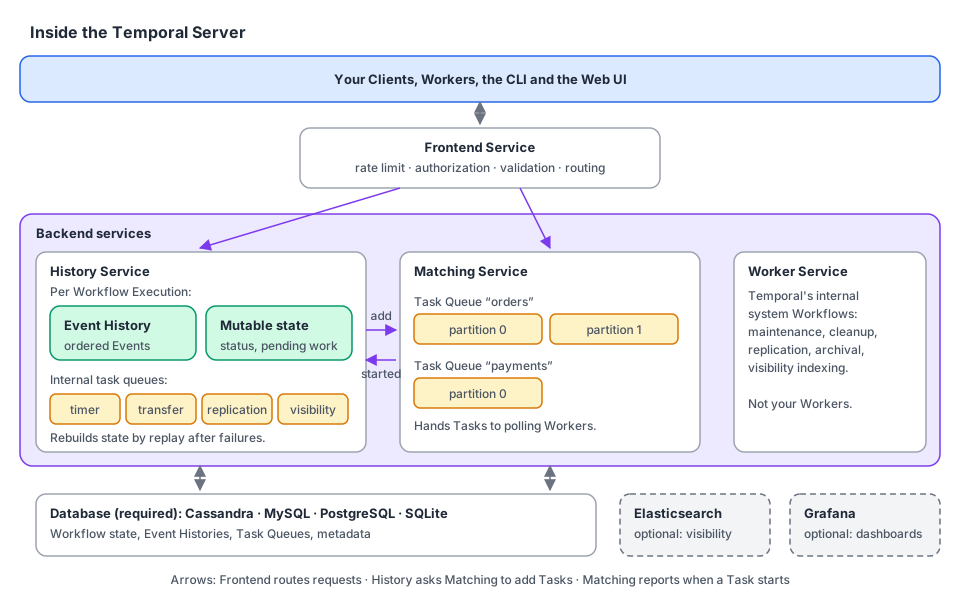
The Temporal Service runs the Temporal Server, its database, and optional components. The Server is one Frontend plus several backend services:
| Part | One-line job | You see it when… |
|---|---|---|
| Frontend Service | The single gRPC entry point: rate limiting, authorization, validation, routing | You call client.Dial, the CLI or the UI |
| History Service | Owns each Workflow Execution: its Event History, mutable state and internal task queues | You open the Event History in the UI |
| Matching Service | Manages Task Queues (and their partitions) and hands Tasks to polling Workers | You look at "pollers" on a Task Queue |
| Worker Service | Runs Temporal's own internal system Workflows (maintenance, cleanup, replication, archival, visibility indexing) | Almost never: it is not your Worker |
| Persistence (required) | Stores Workflow state, Event History, Task Queues and metadata. Cassandra, MySQL, PostgreSQL or SQLite | You size the database |
| Elasticsearch (optional) | Advanced visibility: search Workflow Executions by rich queries | You run temporal workflow list --query … at scale |
| Grafana (optional) | Operational dashboards for observability | You watch the cluster's health |
The rest of this chapter takes each part in turn and shows the Go Client call that touches it. The snippets below form one small diagnostic tool, shopctl, that you can point at any Workflow.
// file: cmd/shopctl/main.go
package main

import (
	"context"
	"flag"
	"log"
	"time"

	"go.temporal.io/sdk/client"
)

func main() {
	workflowID := flag.String("workflow-id", "order-ORD-1042", "Workflow ID to inspect")
	taskQueue := flag.String("task-queue", "orders", "Task Queue to inspect")
	flag.Parse()

	c, err := client.Dial(client.Options{})
	if err != nil {
		log.Fatalln("unable to create Temporal client", err)
	}
	defer c.Close()

	ctx, cancel := context.WithTimeout(context.Background(), 10*time.Second)
	defer cancel()

	checkFrontend(ctx, c)
	describeExecution(ctx, c, *workflowID)
	printHistory(ctx, c, *workflowID)
	describeTaskQueue(ctx, c, *taskQueue)
	countRunningOrders(ctx, c)
}
3. Frontend Service: the front door
From your application's point of view, the Frontend is Temporal. client.Dial connects to it, Workers poll through it, the CLI and the UI call it. It:
- rate-limits requests,
- authorizes them (who may start Workflows in this Namespace?),
- validates them (is the Task Queue name set? is the payload too big?),
- routes them to the right backend service.
Clients never call History or Matching directly, and never your Workers. A quick way to test that the Frontend is reachable is the gRPC health check:
// file: cmd/shopctl/frontend.go
package main

import (
	"context"
	"log"

	"go.temporal.io/sdk/client"
)

// checkFrontend calls the gRPC health check on the Frontend Service.
func checkFrontend(ctx context.Context, c client.Client) {
	if _, err := c.CheckHealth(ctx, &client.CheckHealthRequest{}); err != nil {
		log.Fatalln("Frontend unreachable:", err)
	}
	log.Println("Frontend: healthy")
}
4. History Service: the memory of every Workflow
The History Service keeps track of everything that happens in each Workflow. For each Workflow Execution it persists:
- the ordered Event History: started, Activity scheduled and completed, Signal received, Timer fired, completed or failed;
- the mutable state: the current summary (status, pending Activities, pending Timers…), so the Server doesn't re-read the whole history to answer simple questions;
- internal task queues: timers, transfers (e.g. "put a Workflow Task on Task Queue
orders"), replication and visibility indexing.
The Event History is what makes your application crash-proof: after a failure, Temporal rebuilds the state of a Workflow by replaying it against its history. That's why Workflows must be deterministic and Activities idempotent.
Two Client calls read from History. DescribeWorkflowExecution reads the mutable state (a cheap summary), and GetWorkflowHistory reads the Event History:
// file: cmd/shopctl/history.go
package main

import (
	"context"
	"log"

	enumspb "go.temporal.io/api/enums/v1"
	"go.temporal.io/sdk/client"
)

// describeExecution reads the mutable state: status and pending Activities.
func describeExecution(ctx context.Context, c client.Client, workflowID string) {
	desc, err := c.DescribeWorkflowExecution(ctx, workflowID, "")
	if err != nil {
		log.Println("describe failed:", err)
		return
	}
	info := desc.GetWorkflowExecutionInfo()
	log.Printf("History: %s is %s (type %s, %d events)",
		workflowID, info.GetStatus(), info.GetType().GetName(), info.GetHistoryLength())

	for _, pa := range desc.GetPendingActivities() {
		log.Printf("  pending Activity %s: state=%s attempt=%d last failure=%q",
			pa.GetActivityType().GetName(), pa.GetState(), pa.GetAttempt(), pa.GetLastFailure().GetMessage())
	}
}

// printHistory reads the Event History, one Event per line.
func printHistory(ctx context.Context, c client.Client, workflowID string) {
	iter := c.GetWorkflowHistory(ctx, workflowID, "", false, enumspb.HISTORY_EVENT_FILTER_TYPE_ALL_EVENT)
	for iter.HasNext() {
		event, err := iter.Next()
		if err != nil {
			log.Println("history read failed:", err)
			return
		}
		log.Printf("  %3d  %-40s %s",
			event.GetEventId(), event.GetEventType(), event.GetEventTime().AsTime().Format("15:04:05.000"))
	}
}
Typical output for the order Workflow of chapter 01 (log timestamps removed):
Frontend: healthy
History: order-ORD-1042 is Completed (type ProcessOrderWorkflow, 23 events)
    1  WorkflowExecutionStarted                 10:02:11.204
    2  WorkflowTaskScheduled                    10:02:11.204
    3  WorkflowTaskStarted                      10:02:11.231
    4  WorkflowTaskCompleted                    10:02:11.262
    5  ActivityTaskScheduled                    10:02:11.262
    6  ActivityTaskStarted                      10:02:11.281
    7  ActivityTaskCompleted                    10:02:11.305
    8  WorkflowTaskScheduled                    10:02:11.305
   …
Matching: Workflow poller 41872@orders-worker-7d9f@, last poll 10:02:11
Matching: Activity poller 41872@orders-worker-7d9f@, last poll 10:02:11
Visibility: 0 orders running
Why a "pending Activity" can show
attempt=4while the history shows no failures: while an Activity is being retried, History tracks the attempts in mutable state only. It writesActivityTaskStartedand the finalActivityTaskCompletedorActivityTaskFailedEvents when the last attempt ends. UseDescribeWorkflowExecution(or the UI's "Pending Activities") to see a retrying Activity. Chapter 06, section 5, explains the timing.
5. Matching Service: the dispatcher
The Matching Service manages Task Queues and their partitions (a busy Task Queue is split into partitions so it can scale). When History says "there is a Workflow Task for orders" or "there is an Activity Task for payments", Matching puts it on that queue. When a Worker polls, Matching finds a waiting Task and hands it over. It also decides how many Tasks to give each polling Worker.
The question you will ask Matching most often is "is anybody polling this Task Queue?". A Workflow that stays at WorkflowTaskScheduled almost always means: no Worker polls that Task Queue, or the Workers poll a queue with a slightly different name.
// file: cmd/shopctl/matching.go
package main

import (
	"context"
	"log"

	enumspb "go.temporal.io/api/enums/v1"
	"go.temporal.io/sdk/client"
)

// describeTaskQueue asks Matching which Workers recently polled the queue.
// Workflow Tasks and Activity Tasks are tracked separately.
func describeTaskQueue(ctx context.Context, c client.Client, taskQueue string) {
	for _, tqType := range []enumspb.TaskQueueType{
		enumspb.TASK_QUEUE_TYPE_WORKFLOW,
		enumspb.TASK_QUEUE_TYPE_ACTIVITY,
	} {
		resp, err := c.DescribeTaskQueue(ctx, taskQueue, tqType)
		if err != nil {
			log.Println("describe task queue failed:", err)
			return
		}
		if len(resp.GetPollers()) == 0 {
			log.Printf("Matching: NO %s pollers on %q. Is a Worker running on this Task Queue?", tqType, taskQueue)
			continue
		}
		for _, p := range resp.GetPollers() {
			log.Printf("Matching: %s poller %s, last poll %s",
				tqType, p.GetIdentity(), p.GetLastAccessTime().AsTime().Format("15:04:05"))
		}
	}
}
The same check from the CLI: temporal task-queue describe --task-queue orders.
6. Worker Service: Temporal's own background jobs
The name is confusing, so be precise:
| Worker Service (inside the Server) | Workers (your application) | |
|---|---|---|
| Who runs it | The Temporal Service | You |
| What code | Temporal's internal system Workflows: maintenance, cleanup, replication, archival, visibility indexing | Your Workflows and Activities |
| Do you interact with it? | No | Constantly |
When this guide says "Worker" without a qualifier, it means your Worker (chapter 05).
7. Persistence and visibility
Everything above writes to the database: Workflow state, Event Histories, Task Queues and Workflow metadata. Supported databases are Cassandra, MySQL, PostgreSQL and SQLite (the dev server started by temporal server start-dev uses SQLite). This persistence is what enables recovery and replay: if anything fails, Temporal reconstructs the exact state of a Workflow from its Event History.
Listing and counting Workflows goes through visibility (the History Service's visibility-indexing queue feeds it). Elasticsearch is the optional component for advanced visibility search.
// file: cmd/shopctl/visibility.go
package main

import (
	"context"
	"log"

	"go.temporal.io/api/workflowservice/v1"
	"go.temporal.io/sdk/client"
)

// countRunningOrders uses the visibility store, not the Event Histories.
func countRunningOrders(ctx context.Context, c client.Client) {
	resp, err := c.CountWorkflow(ctx, &workflowservice.CountWorkflowExecutionsRequest{
		Query: "WorkflowType = 'ProcessOrderWorkflow' AND ExecutionStatus = 'Running'",
	})
	if err != nil {
		log.Println("count failed:", err)
		return
	}
	log.Printf("Visibility: %d orders running", resp.GetCount())
}
Visibility is updated asynchronously from History. A Workflow you just started can take a moment to appear in ListWorkflow or CountWorkflow, while DescribeWorkflowExecution sees it at once.
8. Which service answers which call?
| Go Client call | Frontend routes to… |
|---|---|
ExecuteWorkflow, SignalWorkflow, CancelWorkflow, TerminateWorkflow | History (creates or changes the execution) |
GetWorkflow(...).Get, GetWorkflowHistory, DescribeWorkflowExecution | History / persistence |
QueryWorkflow | History and Matching, which deliver the Query to a Worker that runs your Query handler |
ListWorkflow, CountWorkflow | Visibility store |
DescribeTaskQueue | Matching |
Worker polls (PollWorkflowTaskQueue, PollActivityTaskQueue) | Matching |
9. Key takeaways
- Frontend = the only entry point (rate limit, authz, validation, routing).
- History = Event History + mutable state + internal timer/transfer queues for every Workflow. It's the source of truth.
- Matching = Task Queues and polling. "No pollers" is the #1 reason a Workflow doesn't progress.
- Worker Service = Temporal's internal Workflows, not yours.
- Persistence is required (Cassandra, MySQL, PostgreSQL, SQLite). Elasticsearch and Grafana are optional.
- From Go:
CheckHealth(Frontend),DescribeWorkflowExecution/GetWorkflowHistory(History),DescribeTaskQueue(Matching),ListWorkflow/CountWorkflow(visibility).