04 · Starting Workflow Executions
Level: core concept, daily use · Read time: ~15 min Sources: Go SDK — Start a Workflow Execution · Set a Workflow's Task Queue · Set a Workflow ID
1. The problem
Starting a Workflow looks like one function call, but four things must line up or nothing happens: the Task Queue must be one a Worker polls, the Workflow Type must be registered on that Worker, the arguments must be serializable, and the Workflow ID must express what "the same process" means for your business. This chapter is about getting those right.
2. What happens when you call ExecuteWorkflow
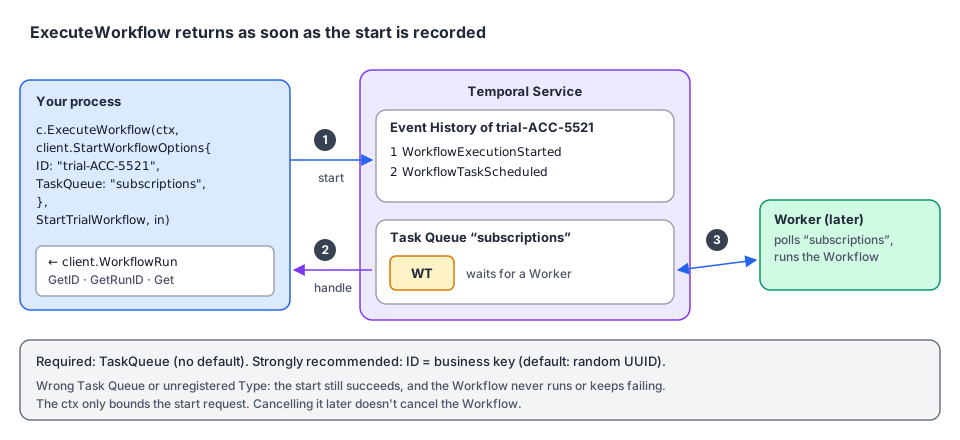
- The Client sends a start request with the Workflow Type, the arguments, the Task Queue and the other
StartWorkflowOptions. - The Service creates the Workflow Execution. Its Event History starts with
WorkflowExecutionStarted, then the first Workflow Task is scheduled (WorkflowTaskScheduled). ExecuteWorkflowreturns aclient.WorkflowRun: a handle withGetID(),GetRunID()andGet(). It returns as soon as the start is recorded. It doesn't wait for the Workflow, or even for a Worker.- Later, a Worker polling that Task Queue picks up the Workflow Task and runs your code.
The ctx you pass to ExecuteWorkflow only bounds the start request. Cancelling it later doesn't cancel the Workflow.
3. The call, in Go
ExecuteWorkflow(ctx, options, workflow, args...) takes a context.Context, a client.StartWorkflowOptions, the Workflow (function or Type name), and the Workflow's arguments.
3.1 By function: when you can import the Workflow
// file: subscriptions/workflow.go
package subscriptions

import (
	"time"

	"go.temporal.io/sdk/workflow"
)

const TaskQueue = "subscriptions"

type StartTrialInput struct {
	AccountID string
	Plan      string // "pro", "team"
	TrialDays int
}

type TrialOutcome struct {
	AccountID string
	Converted bool
}

func StartTrialWorkflow(ctx workflow.Context, in StartTrialInput) (TrialOutcome, error) {
	if err := workflow.Sleep(ctx, time.Duration(in.TrialDays)*24*time.Hour); err != nil {
		return TrialOutcome{}, err
	}
	// … charge the card, convert the account …
	return TrialOutcome{AccountID: in.AccountID, Converted: true}, nil
}// file: cmd/signup/main.go
package main
import (
"context"
"log"
"go.temporal.io/sdk/client"
"github.com/acme/shop/subscriptions"
)
func main() {
c, err := client.Dial(client.Options{})
if err != nil {
log.Fatalln("unable to create Temporal client", err)
}
defer c.Close()
in := subscriptions.StartTrialInput{AccountID: "ACC-5521", Plan: "pro", TrialDays: 14}
run, err := c.ExecuteWorkflow(context.Background(), client.StartWorkflowOptions{
ID: "trial-" + in.AccountID, // business ID: one trial per account
TaskQueue: subscriptions.TaskQueue,
}, subscriptions.StartTrialWorkflow, in) // the function itself: type-checked
if err != nil {
log.Fatalln("unable to start trial", err)
}
log.Println("Started workflow", "WorkflowID", run.GetID(), "RunID", run.GetRunID())
}Passing the function lets the compiler catch a wrong argument type, and the SDK derives the Workflow Type name (StartTrialWorkflow) from it.
3.2 By name: when you can't import the Workflow
When the Workflow lives in another service, an un-importable package, or another language, pass its Workflow Type name as a string. Here the warehouse team runs a Python Worker with AllocateStock on the warehouse Task Queue:
// file: warehouse/contract.go
package warehouse

// The warehouse team's public contract. Keep it next to the code that calls it.
const (
	TaskQueue         = "warehouse"
	AllocateStockType = "AllocateStock" // Workflow Type name registered by the Python Worker
)

// AllocateStockRequest is serialized to JSON. Field names must match what the Python Workflow expects.
type AllocateStockRequest struct {
	OrderID string     `json:"order_id"`
	Lines   []LineItem `json:"lines"`
}

type LineItem struct {
	SKU      string `json:"sku"`
	Quantity int    `json:"quantity"`
}

type AllocateStockResult struct {
	WarehouseCode string `json:"warehouse_code"`
	AllAllocated  bool   `json:"all_allocated"`
}// file: warehouse/client.go
package warehouse
import (
"context"
"go.temporal.io/sdk/client"
)
// StartAllocation wraps the string-typed call so the rest of the code stays type-safe.
func StartAllocation(ctx context.Context, c client.Client, req AllocateStockRequest) (client.WorkflowRun, error) {
return c.ExecuteWorkflow(ctx, client.StartWorkflowOptions{
ID: "allocate-" + req.OrderID,
TaskQueue: TaskQueue,
}, AllocateStockType, req)
}
// WaitForAllocation blocks until the warehouse Workflow returns.
func WaitForAllocation(ctx context.Context, run client.WorkflowRun) (AllocateStockResult, error) {
var res AllocateStockResult
err := run.Get(ctx, &res)
return res, err
}With a string, a typo in the Type name or the Task Queue isn't caught by the compiler. The start succeeds, and the first Workflow Task fails or waits forever. Keep the names in one place, as above.
3.3 Renaming the Workflow Type
The Type name defaults to the Go function name. To decouple it, for example to rename the function without breaking callers, register it under an explicit name:
// file: cmd/subscriptions-worker/main.go
package main

import (
	"log"

	"go.temporal.io/sdk/client"
	"go.temporal.io/sdk/worker"
	"go.temporal.io/sdk/workflow"

	"github.com/acme/shop/subscriptions"
)

func main() {
	c, err := client.Dial(client.Options{})
	if err != nil {
		log.Fatalln("unable to create Temporal client", err)
	}
	defer c.Close()

	w := worker.New(c, subscriptions.TaskQueue, worker.Options{})
	// Callers can now start it with the string "StartTrial", whatever the Go function is called.
	w.RegisterWorkflowWithOptions(subscriptions.StartTrialWorkflow, workflow.RegisterOptions{Name: "StartTrial"})
	if err := w.Run(worker.InterruptCh()); err != nil {
		log.Fatalln("worker stopped", err)
	}
}
4. The Task Queue: the only required option
TaskQueue is the only StartWorkflowOptions field you must set. It has no default. For any code to run, a Worker must poll the same Task Queue name and have the Workflow Type registered.
| Mistake | Symptom |
|---|---|
TaskQueue empty | ExecuteWorkflow returns an error right away |
Name differs from the Worker's ("order" vs "orders") | Start succeeds. The Workflow stays at WorkflowTaskScheduled forever |
| Worker doesn't register the Type | Start succeeds. Workflow Tasks fail on the Worker |
You can split load with host-, Worker- or Workflow-specific Task Queues. That is a Worker topic (see the Architecture guide, chapter 05).
5. The Workflow ID: name it after the business
ID is optional (default: a random UUID), but the SDK docs recommend setting it to a business identifier: an order ID, a customer ID, an invoice number.
| Without a business ID | With ID: "order-" + orderID |
|---|---|
| A retried HTTP request starts a second Workflow for the same order | The second start is rejected or deduplicated (chapter 05) |
| To Signal or Query the order, you must store the UUID somewhere | You can always rebuild the ID from the order ID |
The Web UI shows 0c5a… | The Web UI shows order-ORD-1042 |
A Workflow ID is unique per Namespace among running Workflows. What happens when you reuse one is the subject of the next chapter.
6. Starting from another Workflow
Don't use a Client in Workflow code. To start a Workflow from a Workflow, use a Child Workflow (workflow.ExecuteChildWorkflow), or an Activity that calls the Client. See the Workflows guide, chapter 07.
7. Key takeaways
ExecuteWorkflow(ctx, StartWorkflowOptions, workflow, args...)returns aWorkflowRunas soon as the Service records the start.- Pass the function when you can (type-checked). Pass the Type name string for other services or languages, wrapped in a typed helper.
TaskQueueis required and must match a Worker. A wrong name doesn't fail the start: the Workflow just never runs.- Set
IDto a business identifier. - The
ctxbounds only the start request.