05 · Workers: where your code runs
Level: core concept · Read time: ~15 min Sources: How Temporal works — Worker · About Temporal SDKs — Worker APIs · Go SDK — Run a Worker
1. The problem
The Temporal Server never runs your code, so something else must. That something must be yours (your infrastructure, your secrets, your network access to the payment gateway), must scale out when load grows, and must be disposable: a crashed or redeployed process should lose nothing.
That's a Worker: a process you build with the SDK that polls Task Queues, runs your Workflow and Activity code, and reports back. All the important state stays in the Temporal Service, so any Worker can continue the work of any other.
2. Polling: the Service is a choreographer
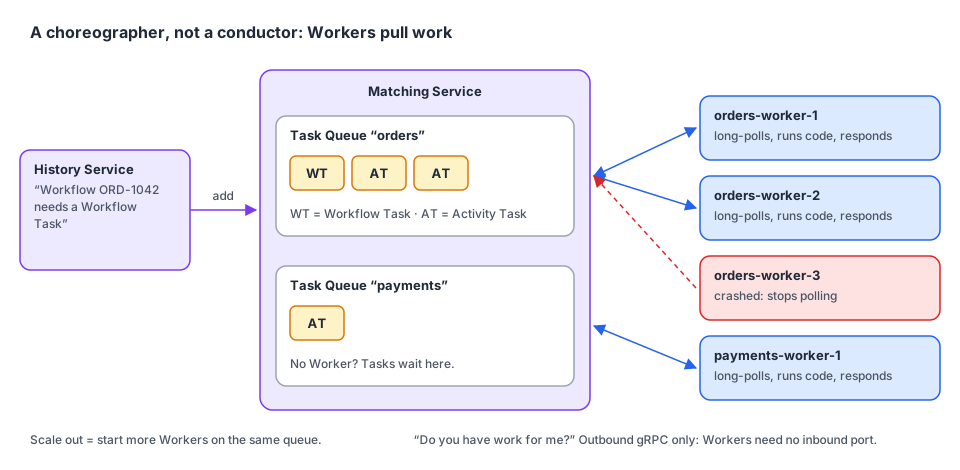
Workers are pulled, not pushed. When a Worker starts, it opens a long-lasting connection to the Frontend and long-polls a Task Queue: "do you have work for me?". The Matching Service answers with a Task when one is available, or holds the poll open until one arrives.
Consequences you can rely on:
- Workers never need an inbound port. They only make outbound gRPC calls. A Worker can live in a private subnet, a laptop or a Lambda function.
- No Worker = work waits, it is not lost. Tasks stay on the Task Queue until a Worker polls.
- Scaling = starting more Workers on the same Task Queue. Matching spreads Tasks across all pollers.
- A Worker that dies mid-Task simply stops responding. The Service times the Task out and hands it to another Worker.
3. What a Worker does with each kind of Task
| Task | What the Worker does | What it sends back |
|---|---|---|
| Workflow Task | Gets the Event History, replays it to rebuild the Workflow's state, runs your Workflow code until it completes or must wait (Activity, Timer, Signal…) | Commands (ScheduleActivityTask, StartTimer, CompleteWorkflowExecution…) with RespondWorkflowTaskCompleted |
| Activity Task | Calls your Activity function with the inputs in the Task | The result (RespondActivityTaskCompleted) or the error (RespondActivityTaskFailed) |
The Server records both as Events in the Event History. Your Workflow and Activity code only ever runs in Workers, which are under your control.
4. Create and run a Worker in Go
A Worker is built from three things: a Client, a Task Queue name, and worker.Options. Then you register your Workflow and Activity types and call Run.
// file: payments/payments.go
package payments

import (
	"context"
	"time"

	"go.temporal.io/sdk/activity"
	"go.temporal.io/sdk/workflow"
)

const TaskQueue = "payments"

type CaptureInput struct {
	PaymentID   string
	AmountCents int64
}

type Gateway interface {
	Capture(ctx context.Context, paymentID string, amountCents int64) (captureID string, err error)
}

type Activities struct {
	Gateway Gateway
}

func (a *Activities) CapturePayment(ctx context.Context, in CaptureInput) (string, error) {
	activity.GetLogger(ctx).Info("Capturing payment", "paymentID", in.PaymentID)
	return a.Gateway.Capture(ctx, in.PaymentID, in.AmountCents)
}

func CapturePaymentWorkflow(ctx workflow.Context, in CaptureInput) (string, error) {
	ctx = workflow.WithActivityOptions(ctx, workflow.ActivityOptions{StartToCloseTimeout: 30 * time.Second})
	var a *Activities
	var captureID string
	err := workflow.ExecuteActivity(ctx, a.CapturePayment, in).Get(ctx, &captureID)
	return captureID, err
}// file: cmd/payments-worker/main.go
package main
import (
"context"
"fmt"
"log"
"os"
"time"
"go.temporal.io/sdk/client"
"go.temporal.io/sdk/worker"
"github.com/acme/shop/payments"
)
type sandboxGateway struct{}
func (sandboxGateway) Capture(_ context.Context, paymentID string, _ int64) (string, error) {
return "cap_" + paymentID, nil
}
func main() {
// 1. A Client: the Worker reaches the Service through the Frontend, like any Client.
c, err := client.Dial(client.Options{})
if err != nil {
log.Fatalln("unable to create Temporal client", err)
}
defer c.Close()
host, _ := os.Hostname()
// 2. A Task Queue name and 3. options. An empty worker.Options{} is fine to start.
w := worker.New(c, payments.TaskQueue, worker.Options{
Identity: fmt.Sprintf("payments-worker@%s", host), // shown as poller identity
MaxConcurrentActivityExecutionSize: 50, // Activities running at once
MaxConcurrentWorkflowTaskExecutionSize: 20, // Workflow Tasks at once
WorkerStopTimeout: 30 * time.Second, // grace period on shutdown
})
// Register every Workflow and Activity type this Task Queue can receive.
w.RegisterWorkflow(payments.CapturePaymentWorkflow)
w.RegisterActivity(&payments.Activities{Gateway: sandboxGateway{}})
// Run blocks, polls, and stops cleanly on SIGINT/SIGTERM:
// it stops polling and waits for in-flight Tasks up to WorkerStopTimeout.
if err := w.Run(worker.InterruptCh()); err != nil {
log.Fatalln("worker stopped", err)
}
}Run is the common choice. For more control (e.g. a Worker inside a larger service with its own lifecycle), call w.Start() and w.Stop() yourself.
5. The registration rule
All Workers polling the same Task Queue must register the same Workflow and Activity types.
A Task Queue does not route by type: any Worker polling it can receive any Task on it. A Worker that receives a Task for a type it didn't register fails that Task. If two teams deploy different code on the same queue name, Tasks fail at random.
The fix is one Task Queue per set of capabilities, and you route each Activity to the queue that can run it:
// file: checkout/workflow.go
package checkout

import (
	"time"

	"go.temporal.io/sdk/workflow"
)

const TaskQueue = "checkout"

type CheckoutInput struct {
	OrderID     string
	PaymentID   string
	AmountCents int64
	PDFTemplate string
}

// CheckoutWorkflow runs on "checkout" Workers, but sends work to two specialized pools.
func CheckoutWorkflow(ctx workflow.Context, in CheckoutInput) error {
	// Payments run on Workers that hold the payment gateway credentials.
	paymentsCtx := workflow.WithActivityOptions(ctx, workflow.ActivityOptions{
		TaskQueue:           "payments",
		StartToCloseTimeout: 30 * time.Second,
	})
	// Invoices are rendered on Workers with lots of CPU and a PDF engine installed.
	invoicesCtx := workflow.WithActivityOptions(ctx, workflow.ActivityOptions{
		TaskQueue:           "invoice-rendering",
		StartToCloseTimeout: 5 * time.Minute,
	})

	// Activities registered on other Workers are called by their type name.
	if err := workflow.ExecuteActivity(paymentsCtx, "CapturePayment", in).Get(ctx, nil); err != nil {
		return err
	}
	return workflow.ExecuteActivity(invoicesCtx, "RenderInvoicePDF", in.OrderID, in.PDFTemplate).Get(ctx, nil)
}
Each Worker pool polls only its own queue and registers only its own types:
| Task Queue | Worker deployment | Registers |
|---|---|---|
checkout | checkout-worker, 3 replicas | CheckoutWorkflow |
payments | payments-worker, 2 replicas, in the PCI network zone | CapturePayment |
invoice-rendering | invoice-worker, autoscaled on CPU | RenderInvoicePDF |
6. Where Workers run
Workers are ordinary processes, so they run wherever your code runs:
- Long-running processes on bare metal, VMs or containers. This is the classic setup. Workers are horizontally scalable and often run on Kubernetes as a Deployment per Task Queue.
- Serverless Workers on serverless platforms such as AWS Lambda, for spiky or low-volume work (see the Go SDK's Serverless Workers guide).
Wherever they run, Workers are always separate from the Temporal Service, including with Temporal Cloud, where Temporal operates the Service and you still run the Workers.
7. Workers are stateless (on purpose)
Because the Server keeps the Event History, retries and timers, Workers hold no critical state:
- Kill a Worker in the middle of a Workflow: another Worker picks up the next Workflow Task, replays the history and continues.
- Kill a Worker in the middle of an Activity: the Activity attempt times out (that's why Activities need a
StartToCloseTimeout) and is retried on another Worker. Make Activities idempotent. - Deploy new Worker code: Workflow Tasks of running executions are replayed with the new code, which is why changing Workflow code needs care (see the Workflows guide, chapter 11).
Performance note: replaying a long history on every Workflow Task would be slow. The Go SDK keeps recently used Workflow Executions in memory (a sticky cache, size set with
worker.SetStickyWorkflowCacheSize) and asks the Server to send that Worker's next Workflow Task for the same execution back to it, with only the new Events. A full replay happens when the execution isn't in the cache: after a restart, an eviction, or on another Worker.
8. Key takeaways
- A Worker = Client + Task Queue + options + registered types +
Run. - Workers poll. They need no inbound port. No Worker means work waits, not work lost.
- Scale by adding Workers on the same Task Queue.
- Every Worker on a Task Queue must register the same types. Route work to specialized pools with
ActivityOptions.TaskQueue. - Workers are stateless and disposable. The Service holds the state.