01 · What is a Namespace?
Level: foundations · Read time: ~10 min Sources: Encyclopedia — Temporal Namespace · Go SDK — Namespaces
1. The problem
Your company runs one Temporal Service. On it you want:
- the production checkout, and a staging copy of the same code that testers can break freely;
- the billing team's Workflows, which must keep their history for 90 days for audits, while checkout only needs 30;
- a guarantee that a load test in staging, or a runaway loop in billing, doesn't slow down checkout;
- no surprise when both teams pick the Workflow ID
invoice-42.
Running one Temporal Service per need is expensive. Putting everything in one pile is fragile. Namespaces are the middle ground: one Service, several isolated compartments.
2. A unit of isolation
A Namespace is a unit of isolation within the Temporal Platform.
Every Workflow Execution and every Task Queue belongs to exactly one Namespace. When you start a Workflow, it is created in the Namespace of the Client that started it. When a Worker polls, it polls Task Queues of its Client's Namespace.
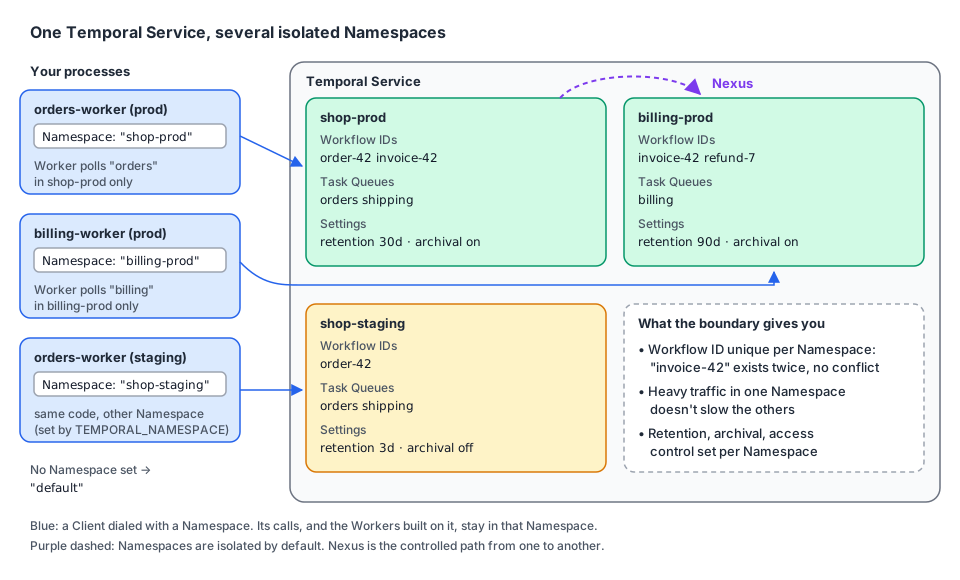
What the boundary gives you:
| Property | What it means | Example |
|---|---|---|
| Workflow ID uniqueness | A Workflow ID is unique within a Namespace only | invoice-42 can run in shop-prod and in billing-prod at the same time |
| Resource isolation | Heavy traffic in one Namespace doesn't impact the others on the same Service | A staging load test doesn't slow production |
| Configuration boundary | Settings such as the Retention Period and Archival are set per Namespace | 90 days for billing-prod, 3 days for shop-staging |
| Access control | Who may use a Namespace is decided per Namespace | Only the billing team can terminate billing Workflows |
| No calls across, by default | Namespaces are isolated. Nexus is the controlled path between them | Checkout calls a billing operation through a Nexus Endpoint |
On a dev server (Temporal Server 1.32.0), the same Workflow ID invoice-42 ran in two Namespaces side by side: two separate Workflow Executions with their own Run IDs, no conflict.
3. Task Queues belong to a Namespace too
A Task Queue name is only meaningful inside a Namespace. The orders Task Queue of shop-prod and the orders Task Queue of shop-staging are two different queues. That's what lets you deploy the same Worker code to both environments, unchanged: only the Namespace differs.
The flip side: a Worker started against the wrong Namespace polls an empty queue, and Workflows started in the right one wait forever. It's the Namespace version of the Task Queue name mismatch described in the Workers guide.
4. The default Namespace
If you don't set a Namespace, the SDKs and the Temporal CLI use the Namespace named default. In Go it is the constant client.DefaultNamespace, so client.Dial(client.Options{}) connects to default.
The dev server (temporal server start-dev) creates default for you. Any other Namespace must be registered before a Client can use it (chapter 03).
5. A Workflow knows its Namespace
A first program: an invoicing Worker and starter that work in whatever Namespace you give them. The Workflow reads its Namespace from workflow.GetInfo, which is handy in logs and when a Workflow must build IDs or call other services per environment.
// file: billing/workflow.go
package billing

import (
	"go.temporal.io/sdk/workflow"
)

const TaskQueue = "billing"

type IssueInvoiceInput struct {
	OrderID     string
	AmountCents int64
}

type InvoiceReceipt struct {
	InvoiceID string
	Namespace string // where this Workflow Execution lives
}

func IssueInvoiceWorkflow(ctx workflow.Context, in IssueInvoiceInput) (InvoiceReceipt, error) {
	info := workflow.GetInfo(ctx)
	workflow.GetLogger(ctx).Info("issuing invoice",
		"namespace", info.Namespace,
		"workflowID", info.WorkflowExecution.ID,
		"taskQueue", info.TaskQueueName)

	return InvoiceReceipt{
		InvoiceID: "inv-" + in.OrderID,
		Namespace: info.Namespace,
	}, nil
}// file: cmd/worker/main.go
package main
import (
"log"
"os"
"go.temporal.io/sdk/client"
"go.temporal.io/sdk/worker"
"github.com/acme/shop/billing"
)
func main() {
namespace := os.Getenv("BILLING_NAMESPACE") // e.g. "billing-prod"; empty means "default"
c, err := client.Dial(client.Options{Namespace: namespace})
if err != nil {
log.Fatalln("unable to create Temporal client:", err)
}
defer c.Close()
// This Worker polls the "billing" Task Queue of that Namespace only.
w := worker.New(c, billing.TaskQueue, worker.Options{})
w.RegisterWorkflow(billing.IssueInvoiceWorkflow)
if err := w.Run(worker.InterruptCh()); err != nil {
log.Fatalln("worker stopped:", err)
}
}// file: cmd/starter/main.go
package main
import (
"context"
"fmt"
"log"
"os"
"go.temporal.io/sdk/client"
"github.com/acme/shop/billing"
)
func main() {
c, err := client.Dial(client.Options{Namespace: os.Getenv("BILLING_NAMESPACE")})
if err != nil {
log.Fatalln("unable to create Temporal client:", err)
}
defer c.Close()
run, err := c.ExecuteWorkflow(context.Background(), client.StartWorkflowOptions{
ID: "invoice-order-42", // unique in this Namespace only
TaskQueue: billing.TaskQueue,
}, billing.IssueInvoiceWorkflow, billing.IssueInvoiceInput{OrderID: "order-42", AmountCents: 12900})
if err != nil {
log.Fatalln("unable to start workflow:", err)
}
var receipt billing.InvoiceReceipt
if err := run.Get(context.Background(), &receipt); err != nil {
log.Fatalln("workflow failed:", err)
}
fmt.Printf("invoice %s issued in Namespace %q (run %s)\n", receipt.InvoiceID, receipt.Namespace, run.GetRunID())
}Run one Worker per Namespace and start the same Workflow ID in each:
$ temporal operator namespace create -n billing-dev --retention 72h
$ BILLING_NAMESPACE=billing-dev go run ./cmd/worker &
$ go run ./cmd/worker &                                   # Namespace "default"

$ BILLING_NAMESPACE=billing-dev go run ./cmd/starter
invoice inv-order-42 issued in Namespace "billing-dev" (run 01a174c3-dd86-…)
$ go run ./cmd/starter
invoice inv-order-42 issued in Namespace "default" (run 01a174c3-ddb3-…)
Same code, same Workflow ID, same Task Queue name: two independent Workflow Executions.
6. One Namespace is still shared
A Namespace isolates you from other Namespaces, not from your neighbors inside it. If two applications or teams share a Namespace, they share its Workflow ID space and its Task Queue names:
- Two services starting
invoice-42in the same Namespace collide (the Workflow ID policies from the Client guide decide what happens). - Two Worker fleets polling
ordersin the same Namespace receive each other's Tasks.
If you share a Namespace, agree on prefixes (checkout-…, billing-…) for Workflow IDs and Task Queues. Chapter 06 covers how to split Namespaces in the first place.
7. Self-hosted vs Temporal Cloud
The concept is the same on both, and moving between them needs no code change: only the Client's address, Namespace and credentials change. Temporal Cloud Namespaces add:
| Temporal Cloud adds | What it gives you |
|---|---|
| Authentication per Namespace | API keys or mTLS certificates scoped to one Namespace (Client guide, chapter 03) |
| Role-based access control | Namespace-level permissions instead of a custom Authorizer |
| Separate rate limits | Limits per Namespace |
| High availability | Replication of a Namespace to another region or cloud |
| Tags and descriptions | Metadata to organize many Namespaces |
On a self-hosted Service, you restrict who can use or manage a Namespace with a custom Authorizer plugin on the Frontend Service.
8. Key takeaways
- A Namespace is a unit of isolation. Workflow Executions and Task Queues belong to exactly one.
- Workflow IDs and Task Queue names are unique only within a Namespace.
- Retention, archival and access control are set per Namespace. Load in one doesn't affect others.
- No Namespace set means
default(client.DefaultNamespace). Other Namespaces must be registered first. - Namespaces don't call each other by default. Nexus is the controlled path between them.
- A shared Namespace is still shared: agree on ID and Task Queue prefixes.