06 · Message passing: Queries, Signals and Updates
Level: core concept · Read time: ~25 min Sources: Go SDK — Workflow message passing · Go SDK — Selectors · Encyclopedia — Events and Event History · Encyclopedia — Timers and Start Delays · Encyclopedia — Workflow Id and Run Id
1. The problem
Up to now, a Workflow received its input at start time and returned a result at the end. Real business processes don't work like that. While they run, other systems need to read their state and steer them:
- the web shop shows "3 items, €42.50" → it needs to read the cart
- the customer clicks "remove" → the cart must change, and nobody needs to wait for it
- the customer clicks "add to cart" → the cart must change and the UI needs the new total, or an error such as "unknown product"
Without Temporal you would put the cart in a database, add an API in front of it, add locking, and poll for changes. With Temporal, a Workflow Execution can act like a stateful web service. It holds the state in plain Go variables and exposes three kinds of endpoints:
| Message | Direction | Caller waits? | Can change state? | Written to Event History? |
|---|---|---|---|---|
| Query | read | yes, for the answer | ❌ no | ❌ no |
| Signal | write | only until the Service accepts it | ✅ yes | ✅ WorkflowExecutionSignaled |
| Update | write + read | yes, until accepted, and optionally until completed | ✅ yes | ✅ WorkflowExecutionUpdateAccepted + WorkflowExecutionUpdateCompleted (nothing if rejected) |
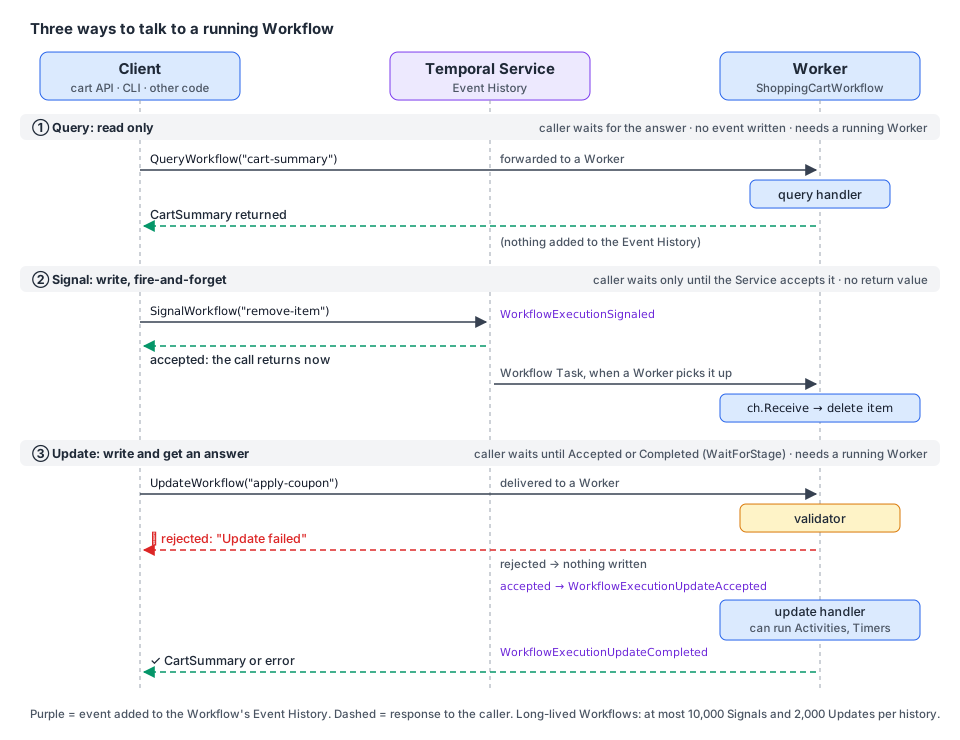
Rules that apply to all three: values sent in messages and the values handlers return must be serializable, and you should prefer a single struct argument over several arguments, so you can add fields later without changing the signature.
2. The running example: a shopping cart per customer
We build one long-lived ShoppingCartWorkflow per customer, with Workflow ID cart-<customerID>. This kind of Workflow, which represents one business object rather than a one-off process, is often called an entity Workflow.
⚠️ Use an internal, opaque customer ID in the Workflow ID, never an e-mail address. Workflow IDs, Signal names, Query names and Update names are stored in plain text and are visible in the UI, the CLI and the logs. They are not encrypted by a Payload Codec.
| Name | Kind | What it does |
|---|---|---|
cart-summary | Query | returns items and totals |
add-item | Update | adds a product. A validator rejects unknown SKUs and quantities ≤ 0 |
apply-coupon | Update | calls a ValidateCoupon Activity, so the handler blocks. Guarded by a workflow.Mutex |
remove-item | Signal | removes a product, fire-and-forget |
checkout | Signal | ends the cart. The Workflow places the order and Signals the customer's loyalty Workflow |
Shared types and names
Put message names and payload types in one place. Clients and the Workflow import the same constants, so a typo can't silently send a Signal nobody listens to.
// file: carts/messages.go
package carts

// Message names: the contract between the cart API and the Workflow.
const (
	TaskQueue = "carts"

	CartSummaryQuery  = "cart-summary"
	AddItemUpdate     = "add-item"
	ApplyCouponUpdate = "apply-coupon"
	RemoveItemSignal  = "remove-item"
	CheckoutSignal    = "checkout"

	// Sent to the customer's LoyaltyAccountWorkflow (see chapter 09).
	PointsEarnedSignal = "points-earned"
)

// CartWorkflowID gives one cart per customer. Use an internal ID, never PII.
func CartWorkflowID(customerID string) string { return "cart-" + customerID }

// LoyaltyWorkflowID is the ID of the customer's loyalty account Workflow.
func LoyaltyWorkflowID(customerID string) string { return "loyalty-" + customerID }

type CartInput struct {
	CustomerID string
}

type CartItem struct {
	SKU            string
	Quantity       int
	UnitPriceCents int64
}

type CartSummary struct {
	Items         []CartItem
	SubtotalCents int64
	DiscountCents int64
	TotalCents    int64
	Coupon        string
	CheckedOut    bool
}

type AddItemRequest struct {
	SKU      string
	Quantity int
}

type RemoveItemRequest struct {
	SKU string
}

type ApplyCouponRequest struct {
	Code string
}

type CheckoutRequest struct {
	PaymentMethodID string
}

type CheckoutResult struct {
	OrderID    string
	TotalCents int64
}

type PointsEarned struct {
	OrderID string
	Points  int64
}
The Activities
The cart itself has no I/O. Only coupon validation and order placement talk to other systems, so they are Activities.
// file: carts/activities.go
package carts

import "context"

type CouponDecision struct {
	Valid           bool
	DiscountPercent int64
	Reason          string
}

// CouponService and OrderService are your real backends (HTTP clients, DB access...).
type CouponService interface {
	Check(ctx context.Context, code string, subtotalCents int64) (CouponDecision, error)
}

type OrderService interface {
	Place(ctx context.Context, customerID, paymentMethodID string, items []CartItem, totalCents int64) (string, error)
}

type PlaceOrderRequest struct {
	CustomerID      string
	PaymentMethodID string
	Items           []CartItem
	TotalCents      int64
}

type CartActivities struct {
	Coupons CouponService
	Orders  OrderService
}

func (a *CartActivities) ValidateCoupon(ctx context.Context, code string, subtotalCents int64) (CouponDecision, error) {
	return a.Coupons.Check(ctx, code, subtotalCents)
}

func (a *CartActivities) PlaceOrder(ctx context.Context, req PlaceOrderRequest) (string, error) {
	return a.Orders.Place(ctx, req.CustomerID, req.PaymentMethodID, req.Items, req.TotalCents)
}
The cart state
Plain Go. Note workflow.DeterministicKeys: iterating a map with range gives a random order, which is not allowed in Workflow code (see chapter 03). The helper returns the keys sorted.
// file: carts/state.go
package carts

import "go.temporal.io/sdk/workflow"

// priceList stands in for the product catalog. In production, load it with an
// Activity at the start of the Workflow (it must not change during replay).
var priceList = map[string]int64{
	"SKU-COFFEE-1KG": 1890,
	"SKU-GRINDER":    8900,
	"SKU-FILTERS":    450,
}

type cartState struct {
	items           map[string]CartItem
	coupon          string
	discountPercent int64
	checkedOut      bool
}

func (c *cartState) subtotal() int64 {
	var total int64
	for _, sku := range workflow.DeterministicKeys(c.items) {
		item := c.items[sku]
		total += int64(item.Quantity) * item.UnitPriceCents
	}
	return total
}

func (c *cartState) summary() CartSummary {
	s := CartSummary{Coupon: c.coupon, CheckedOut: c.checkedOut}
	for _, sku := range workflow.DeterministicKeys(c.items) {
		s.Items = append(s.Items, c.items[sku])
	}
	s.SubtotalCents = c.subtotal()
	s.DiscountCents = s.SubtotalCents * c.discountPercent / 100
	s.TotalCents = s.SubtotalCents - s.DiscountCents
	return s
}
3. Queries: read the state
A Query is a synchronous, read-only request. The handler is a plain function, registered with workflow.SetQueryHandler. It must return two values, a serializable result and an error.
// file: carts/query.go
package carts

import "go.temporal.io/sdk/workflow"

func registerCartQuery(ctx workflow.Context, cart *cartState) error {
	return workflow.SetQueryHandler(ctx, CartSummaryQuery, func() (CartSummary, error) {
		// Read only: a Query handler must never change cart.
		return cart.summary(), nil
	})
}
What you need to know about Queries:
- No events. Sending a Query doesn't add anything to the Event History.
- No blocking work. A Query handler can't run Activities, sleep or wait. It inspects state and returns.
- A Worker must be running. The Query is answered by Workflow code, so a Worker must be polling the Task Queue. Otherwise the Client gets a
FAILED_PRECONDITIONerror. - Closed Workflows can be queried (completed, failed, timed out) during the Namespace retention period. Terminated Workflows can't. So a checked-out cart can still answer
cart-summaryfor a while.
4. Signals: change the state, fire-and-forget
A Signal is an asynchronous message. The Client call returns as soon as the Temporal Service has accepted it and written WorkflowExecutionSignaled to the history. It does not wait for the Workflow to process it, and it can't return a value.
In Go, Signals arrive on a Signal Channel: workflow.GetSignalChannel(ctx, name). You read it with:
| API | Behaviour |
|---|---|
ch.Receive(ctx, &v) | blocks until a Signal arrives |
ch.ReceiveAsync(&v) | returns false immediately if nothing is buffered. Used to drain |
selector.AddReceive(ch, fn) | waits on several channels, timers and futures at once (chapter 05) |
Two rules from the docs:
- Signals are buffered. If a Signal arrives before your code calls
GetSignalChannel, the SDK keeps it. So you can finish initialization first, then start reading. - Drain before you finish. Before the Workflow completes or Continues-As-New, read any remaining Signals with
ReceiveAsync. Otherwise they are lost.
The main loop of our cart waits on two Signal Channels with a Selector. Matching a channel in a Selector doesn't consume the message, so each callback calls Receive:
// file: carts/signals.go
package carts

import "go.temporal.io/sdk/workflow"

// waitForCheckout processes remove-item Signals until a checkout Signal arrives.
func waitForCheckout(ctx workflow.Context, cart *cartState) CheckoutRequest {
	removeCh := workflow.GetSignalChannel(ctx, RemoveItemSignal)
	checkoutCh := workflow.GetSignalChannel(ctx, CheckoutSignal)

	var checkout CheckoutRequest
	for !cart.checkedOut {
		selector := workflow.NewSelector(ctx)
		selector.AddReceive(removeCh, func(c workflow.ReceiveChannel, more bool) {
			var req RemoveItemRequest
			c.Receive(ctx, &req)
			delete(cart.items, req.SKU)
		})
		selector.AddReceive(checkoutCh, func(c workflow.ReceiveChannel, more bool) {
			c.Receive(ctx, &checkout)
			cart.checkedOut = true
		})
		selector.Select(ctx)
	}
	return checkout
}

// drainRemovals applies remove-item Signals that are still buffered.
// Without this, they would be silently lost when the Workflow completes.
func drainRemovals(ctx workflow.Context, cart *cartState) {
	removeCh := workflow.GetSignalChannel(ctx, RemoveItemSignal)
	for {
		var req RemoveItemRequest
		if !removeCh.ReceiveAsync(&req) {
			return
		}
		delete(cart.items, req.SKU)
	}
}
Signals from another Workflow (External Signal)
A Workflow can Signal another Workflow with workflow.SignalExternalWorkflow. The sender's history gets SignalExternalWorkflowExecutionInitiated, and the receiver's history gets WorkflowExecutionSignaled. The call returns a Future that holds either an empty success or a failure. With an empty Run ID, the currently running Workflow with that ID gets the Signal. You can only Signal Workflows that are still open.
// file: carts/loyalty.go
package carts

import "go.temporal.io/sdk/workflow"

// notifyLoyalty tells the customer's LoyaltyAccountWorkflow (chapter 09) about earned points.
// A missing loyalty account must not break checkout, so the error is only logged.
func notifyLoyalty(ctx workflow.Context, customerID string, points PointsEarned) {
	err := workflow.SignalExternalWorkflow(ctx, LoyaltyWorkflowID(customerID), "", PointsEarnedSignal, points).Get(ctx, nil)
	if err != nil {
		workflow.GetLogger(ctx).Warn("Could not signal loyalty account", "customerID", customerID, "error", err)
	}
}
5. Updates: change the state and get an answer
An Update is a trackable, synchronous request. It can change state, run blocking work (Activities, Timers, workflow.Await), and return a value or an error to the caller.
Register it with workflow.SetUpdateHandler or workflow.SetUpdateHandlerWithOptions:
- The handler's first parameter is a
workflow.Context. It returns(T, error)or justerror. - An optional validator takes the same arguments and returns one
error. It runs before anything is written to history:- validator returns
nil(or there is no validator) →WorkflowExecutionUpdateAcceptedis written, then the handler runs - validator returns an error (or panics) → the Update is rejected, nothing is written, and the caller gets an "Update failed" error
- validator returns
- When the handler finishes →
WorkflowExecutionUpdateCompletedis written. - A validator only reads. Don't change state there.
Because each Update adds events, a long-lived Workflow has a budget: the history allows at most 2,000 Updates and 10,000 Signals before the Workflow is terminated. Long-lived entities must Continue-As-New (chapter 09).
add-item: validated, non-blocking
// file: carts/update_add_item.go
package carts

import (
	"errors"
	"fmt"

	"go.temporal.io/sdk/workflow"
)

func registerAddItem(ctx workflow.Context, cart *cartState) error {
	return workflow.SetUpdateHandlerWithOptions(ctx, AddItemUpdate,
		func(ctx workflow.Context, req AddItemRequest) (CartSummary, error) {
			item := cart.items[req.SKU]
			item.SKU = req.SKU
			item.Quantity += req.Quantity
			item.UnitPriceCents = priceList[req.SKU]
			cart.items[req.SKU] = item
			return cart.summary(), nil
		},
		workflow.UpdateHandlerOptions{
			// Reject bad requests before they reach the Event History.
			Validator: func(ctx workflow.Context, req AddItemRequest) error {
				if cart.checkedOut {
					return errors.New("cart is already checked out")
				}
				if req.Quantity <= 0 {
					return fmt.Errorf("quantity must be positive, got %d", req.Quantity)
				}
				if _, ok := priceList[req.SKU]; !ok {
					return fmt.Errorf("unknown product %q", req.SKU)
				}
				return nil
			},
		})
}apply-coupon: a blocking handler
Signal and Update handlers can block: run Activities, sleep, wait on conditions. That is powerful, but it means handlers and the main Workflow function run concurrently. Temporal runs them one at a time and switches between them only when one blocks (an Activity call, Sleep, Await...).
Here is the bug that creates. Two apply-coupon Updates arrive at almost the same time:
handler A: reads subtotal → ExecuteActivity(ValidateCoupon "WELCOME10")  ── blocks ──┐
handler B: reads subtotal → ExecuteActivity(ValidateCoupon "VIP25")      ── blocks ──┤
handler B resumes: coupon = VIP25, discount = 25%                                    │
handler A resumes: coupon = WELCOME10, discount = 10%   ← last writer wins, randomly ◄┘
workflow.NewMutex fixes it. Only one holder of the lock runs the critical section at a time. The others wait in Lock(ctx).
workflow.GetCurrentUpdateInfo(ctx) returns the Update's ID and name. The ID is useful for logs and for de-duplication when the same request may be sent twice.
// file: carts/update_apply_coupon.go
package carts

import (
	"errors"
	"time"

	"go.temporal.io/sdk/temporal"
	"go.temporal.io/sdk/workflow"
)

func registerApplyCoupon(ctx workflow.Context, cart *cartState) error {
	couponLock := workflow.NewMutex(ctx)

	return workflow.SetUpdateHandlerWithOptions(ctx, ApplyCouponUpdate,
		func(ctx workflow.Context, req ApplyCouponRequest) (CartSummary, error) {
			// Only one coupon validation at a time. Others wait here.
			if err := couponLock.Lock(ctx); err != nil {
				return CartSummary{}, err
			}
			defer couponLock.Unlock()

			info := workflow.GetCurrentUpdateInfo(ctx)
			workflow.GetLogger(ctx).Info("Applying coupon", "updateID", info.ID, "code", req.Code)

			actx := workflow.WithActivityOptions(ctx, workflow.ActivityOptions{StartToCloseTimeout: 10 * time.Second})
			var a *CartActivities
			var decision CouponDecision
			if err := workflow.ExecuteActivity(actx, a.ValidateCoupon, req.Code, cart.subtotal()).Get(actx, &decision); err != nil {
				return CartSummary{}, err
			}
			if !decision.Valid {
				// Fails this Update only. The cart Workflow keeps running.
				return CartSummary{}, temporal.NewApplicationError("coupon rejected: "+decision.Reason, "CouponRejected")
			}
			cart.coupon = req.Code
			cart.discountPercent = decision.DiscountPercent
			return cart.summary(), nil
		},
		workflow.UpdateHandlerOptions{
			Validator: func(ctx workflow.Context, req ApplyCouponRequest) error {
				if cart.checkedOut {
					return errors.New("cart is already checked out")
				}
				if req.Code == "" {
					return errors.New("coupon code is required")
				}
				return nil
			},
		})
}
💡 Returning an error from an Update handler fails that Update. The caller gets the error, and the Workflow keeps running. A Workflow fails only when the main function returns an error.
6. The Workflow: putting it together
Two more patterns appear in the main function:
- Register handlers early, before the first blocking call, so the Workflow can answer from the start. (Delaying registration is also safe: the SDK buffers Updates until a handler exists. But
SetUpdateHandlerthen runs buffered Updates immediately, which can reorder messages of different types.) - Wait for all handlers to finish before you return with
workflow.Await(ctx, func() bool { return workflow.AllHandlersFinished(ctx) }). If the main function returns (or Continues-As-New) while anapply-couponhandler is still waiting on its Activity, the handler is interrupted and its caller gets a "workflow execution already completed" error. By default the Worker logs a warning for unfinished Update handlers. You can silence it per handler withworkflow.UpdateHandlerOptions{UnfinishedPolicy: workflow.HandlerUnfinishedPolicyAbandon}, but only do that if abandoning really is fine.
// file: carts/workflow.go
package carts

import (
	"time"

	"go.temporal.io/sdk/workflow"
)

func ShoppingCartWorkflow(ctx workflow.Context, in CartInput) (CheckoutResult, error) {
	cart := &cartState{items: map[string]CartItem{}}

	// 1. Expose the endpoints before doing anything that blocks.
	if err := registerCartQuery(ctx, cart); err != nil {
		return CheckoutResult{}, err
	}
	if err := registerAddItem(ctx, cart); err != nil {
		return CheckoutResult{}, err
	}
	if err := registerApplyCoupon(ctx, cart); err != nil {
		return CheckoutResult{}, err
	}

	// 2. Process Signals until the customer checks out.
	checkout := waitForCheckout(ctx, cart)

	// 3. Let in-flight Updates (e.g. a coupon being validated) finish.
	if err := workflow.Await(ctx, func() bool { return workflow.AllHandlersFinished(ctx) }); err != nil {
		return CheckoutResult{}, err
	}
	// 4. Apply Signals that are still buffered, so none are lost.
	drainRemovals(ctx, cart)

	// 5. Place the order.
	summary := cart.summary()
	actx := workflow.WithActivityOptions(ctx, workflow.ActivityOptions{StartToCloseTimeout: 30 * time.Second})
	var a *CartActivities
	var orderID string
	err := workflow.ExecuteActivity(actx, a.PlaceOrder, PlaceOrderRequest{
		CustomerID:      in.CustomerID,
		PaymentMethodID: checkout.PaymentMethodID,
		Items:           summary.Items,
		TotalCents:      summary.TotalCents,
	}).Get(ctx, &orderID)
	if err != nil {
		return CheckoutResult{}, err
	}

	// 6. One loyalty point per euro spent, sent to another Workflow.
	notifyLoyalty(ctx, in.CustomerID, PointsEarned{OrderID: orderID, Points: summary.TotalCents / 100})

	return CheckoutResult{OrderID: orderID, TotalCents: summary.TotalCents}, nil
}
🧪 Exercise: an abandoned cart stays open forever. Replace
selector.Select(ctx)with a loop that also waits on a 30-day Timer (chapter 05) and closes the cart when it fires.
7. Sending messages from a Client
Everything is sent through client.Client. Look at the handler in the Workflow to know the argument and return types.
| I want to… | Client API | Notes |
|---|---|---|
| Read state | QueryWorkflow(ctx, wfID, runID, name, args...) → EncodedValue.Get(&out) | empty runID = the current run |
| Send a Signal | SignalWorkflow(ctx, wfID, runID, name, arg) | returns when the Service accepts it |
| Signal, starting the Workflow if needed | SignalWithStartWorkflow(ctx, wfID, name, arg, startOptions, wf, wfArgs...) | no Run ID: the Workflow may not exist yet |
| Send an Update | UpdateWorkflow(ctx, client.UpdateWorkflowOptions{…, WaitForStage}) → handle.Get(ctx, &out) | WaitForStage is required |
| Update, starting the Workflow if needed | UpdateWithStartWorkflow(ctx, client.UpdateWithStartWorkflowOptions{…}) | needs a Workflow ID Conflict Policy |
WaitForStage decides when UpdateWorkflow returns its handle:
client.WorkflowUpdateStageAccepted: after the validator passed. Callhandle.Getlater for the result.client.WorkflowUpdateStageCompleted: after the handler finished.handle.Getreturns immediately.
Always pass a context.WithTimeout when you send an Update. If no Worker is polling, the SDK keeps retrying until the context is cancelled.
Update-With-Start: the "add to cart" button
The customer's first "add to cart" must create the cart. Later ones must reuse it. That is exactly what Update-With-Start does:
- if a Workflow with that ID is running, the Update is sent to it
- if not, the Workflow is started and the Update is processed before the main Workflow function starts running
You must set a Workflow ID Conflict Policy. Use WORKFLOW_ID_CONFLICT_POLICY_USE_EXISTING, and make the handler safe to run again, in case the Client retries after a failure. (Not every start option is allowed here. A CronSchedule, for example, causes an error.) A WithStartWorkflowOperation can be used only once.
// file: cmd/cart-api/main.go
package main

import (
	"context"
	"log"
	"time"

	"github.com/acme/shop/carts"
	enumspb "go.temporal.io/api/enums/v1"
	"go.temporal.io/sdk/client"
)

// CartAPI is what your HTTP handlers call. It holds one long-lived Temporal Client.
type CartAPI struct {
	Temporal client.Client
}

func startOptions(customerID string) client.StartWorkflowOptions {
	return client.StartWorkflowOptions{
		ID:                       carts.CartWorkflowID(customerID),
		TaskQueue:                carts.TaskQueue,
		WorkflowIDConflictPolicy: enumspb.WORKFLOW_ID_CONFLICT_POLICY_USE_EXISTING,
	}
}

// AddItem creates the cart on first use (Update-With-Start) and returns the new totals.
func (api *CartAPI) AddItem(ctx context.Context, customerID string, req carts.AddItemRequest) (carts.CartSummary, error) {
	ctx, cancel := context.WithTimeout(ctx, 15*time.Second)
	defer cancel()

	startOp := api.Temporal.NewWithStartWorkflowOperation(startOptions(customerID),
		carts.ShoppingCartWorkflow, carts.CartInput{CustomerID: customerID})

	handle, err := api.Temporal.UpdateWithStartWorkflow(ctx, client.UpdateWithStartWorkflowOptions{
		StartWorkflowOperation: startOp,
		UpdateOptions: client.UpdateWorkflowOptions{
			UpdateName:   carts.AddItemUpdate,
			WaitForStage: client.WorkflowUpdateStageCompleted,
			Args:         []any{req},
		},
	})
	if err != nil {
		return carts.CartSummary{}, err // includes validator rejections ("unknown product")
	}
	var summary carts.CartSummary
	err = handle.Get(ctx, &summary)
	return summary, err
}

// Summary reads the cart with a Query. No event is written.
func (api *CartAPI) Summary(ctx context.Context, customerID string) (carts.CartSummary, error) {
	value, err := api.Temporal.QueryWorkflow(ctx, carts.CartWorkflowID(customerID), "", carts.CartSummaryQuery)
	if err != nil {
		return carts.CartSummary{}, err
	}
	var summary carts.CartSummary
	err = value.Get(&summary)
	return summary, err
}

// RemoveItem is fire-and-forget. Signal-With-Start means the API doesn't need to know
// whether the cart exists yet. It can't return a result: use an Update if the UI needs one.
func (api *CartAPI) RemoveItem(ctx context.Context, customerID, sku string) error {
	_, err := api.Temporal.SignalWithStartWorkflow(ctx, carts.CartWorkflowID(customerID),
		carts.RemoveItemSignal, carts.RemoveItemRequest{SKU: sku},
		startOptions(customerID), carts.ShoppingCartWorkflow, carts.CartInput{CustomerID: customerID})
	return err
}

// ApplyCoupon waits for the handler to finish, because the UI shows the discount.
func (api *CartAPI) ApplyCoupon(ctx context.Context, customerID, code string) (carts.CartSummary, error) {
	ctx, cancel := context.WithTimeout(ctx, 15*time.Second)
	defer cancel()

	handle, err := api.Temporal.UpdateWorkflow(ctx, client.UpdateWorkflowOptions{
		WorkflowID:   carts.CartWorkflowID(customerID),
		UpdateName:   carts.ApplyCouponUpdate,
		WaitForStage: client.WorkflowUpdateStageCompleted,
		Args:         []any{carts.ApplyCouponRequest{Code: code}},
	})
	if err != nil {
		return carts.CartSummary{}, err
	}
	var summary carts.CartSummary
	err = handle.Get(ctx, &summary) // "coupon rejected: ..." arrives here
	return summary, err
}

// Checkout ends the cart. The order result is available later from the Workflow result.
func (api *CartAPI) Checkout(ctx context.Context, customerID, paymentMethodID string) error {
	return api.Temporal.SignalWorkflow(ctx, carts.CartWorkflowID(customerID), "",
		carts.CheckoutSignal, carts.CheckoutRequest{PaymentMethodID: paymentMethodID})
}

func main() {
	c, err := client.Dial(client.Options{})
	if err != nil {
		log.Fatalln("Unable to create client", err)
	}
	defer c.Close()

	api := &CartAPI{Temporal: c}
	ctx := context.Background()

	summary, err := api.AddItem(ctx, "c-1042", carts.AddItemRequest{SKU: "SKU-COFFEE-1KG", Quantity: 2})
	if err != nil {
		log.Fatalln("add-item failed", err)
	}
	log.Printf("Cart total: %d cents", summary.TotalCents)
}
📝 In the Go SDK,
SignalWithStartWorkflowusesWorkflowIDReusePolicyAllowDuplicate by default (from the SDK doc comment). After a cart is checked out, a newremove-itemwould start a new, empty cart with the same ID. If that's wrong for your use case, set a different reuse policy (chapter 04).
❌ You can't send an Update from one Workflow to another. To do it anyway, call an Activity that uses a Client. Signals (
SignalExternalWorkflow) are the Workflow-to-Workflow option.
The Worker
// file: cmd/cart-worker/main.go
package main

import (
	"context"
	"log"

	"github.com/acme/shop/carts"
	"go.temporal.io/sdk/client"
	"go.temporal.io/sdk/worker"
)

type fakeCoupons struct{}

func (fakeCoupons) Check(ctx context.Context, code string, subtotalCents int64) (carts.CouponDecision, error) {
	if code == "WELCOME10" {
		return carts.CouponDecision{Valid: true, DiscountPercent: 10}, nil
	}
	return carts.CouponDecision{Valid: false, Reason: "unknown code"}, nil
}

type fakeOrders struct{}

func (fakeOrders) Place(ctx context.Context, customerID, paymentMethodID string, items []carts.CartItem, totalCents int64) (string, error) {
	return "ord-" + customerID, nil
}

func main() {
	c, err := client.Dial(client.Options{})
	if err != nil {
		log.Fatalln("Unable to create client", err)
	}
	defer c.Close()

	w := worker.New(c, carts.TaskQueue, worker.Options{})
	w.RegisterWorkflow(carts.ShoppingCartWorkflow)
	w.RegisterActivity(&carts.CartActivities{Coupons: fakeCoupons{}, Orders: fakeOrders{}})

	if err := w.Run(worker.InterruptCh()); err != nil {
		log.Fatalln("Unable to start Worker", err)
	}
}
Try it with the CLI while the Worker runs:
temporal workflow query  --workflow-id cart-c-1042 --type cart-summary
temporal workflow signal --workflow-id cart-c-1042 --name remove-item --input '{"SKU":"SKU-FILTERS"}'
temporal workflow update execute --workflow-id cart-c-1042 --name apply-coupon --input '{"Code":"WELCOME10"}'
temporal workflow signal --workflow-id cart-c-1042 --name checkout --input '{"PaymentMethodID":"pm_123"}'
8. Choosing between Query, Signal and Update
| Question | Query | Signal | Update |
|---|---|---|---|
| Need the current state, no change? | ✅ | ||
| Need to change state, don't need an answer? | ✅ | ||
| Need to change state and get a result or validation error? | ✅ | ||
| Caller must not wait for a Worker? | ✅ the Service accepts it even if no Worker is up | ❌ a Worker must accept it | |
| Can the handler run Activities / Timers? | ❌ | ✅ | ✅ |
| Can it be rejected before it's recorded? | — | ❌ | ✅ with a validator |
| Sent from another Workflow? | ❌ | ✅ SignalExternalWorkflow | ❌ (use an Activity) |
| Start the Workflow if missing? | ❌ | ✅ Signal-With-Start | ✅ Update-With-Start |
| History cost | none | 1 event | 2 events if accepted |
💡 The docs' advice: if you need a response as soon as the Server receives the request, use a Signal. An Update makes the caller wait for a Worker.
9. Troubleshooting
All three can fail with "the Client can't reach the Server" and "the Workflow doesn't exist". The rest differs, because Queries and Updates wait for a Worker:
| Symptom | Message | What's going on |
|---|---|---|
| Update call never returns | Update | No Worker is polling the Task Queue. The SDK retries until your context is cancelled. Always set a timeout. |
| "Update failed" | Update | The validator rejected it, or the handler returned an error (failed Activity with finite retries, failed Child Workflow, your own error, or a panic depending on WorkflowPanicPolicy). |
FAILED_PRECONDITION | Update | The handler made the Workflow Task fail before the Update was accepted. Once accepted, an Update is durable: after you fix and redeploy, get its result with a WorkflowUpdateHandle. |
| "workflow execution already completed" | Update | The Workflow finished while the handler was still running: it was cancelled or failed, or it completed / Continued-As-New without waiting for AllHandlersFinished. |
FAILED_PRECONDITION | Query | No Worker is polling the Task Queue. |
QueryFailed | Query | The Query handler returned an error or panicked. Unlike Signals and Updates, a panic in a Query handler doesn't fail the Workflow Task. |
| Workflow Task fails | Query | The Query handler blocked too long without yielding. |
| Signals "disappear" | Signal | The Workflow completed or Continued-As-New with Signals still in the channel. Drain with ReceiveAsync. |
Key takeaways
- A Workflow can be a stateful service: Queries read, Signals write without an answer, Updates write and answer.
- Queries write no events. Signals write one. Accepted Updates write two, rejected ones none.
- Use validators to reject bad Updates before they reach the history. Validators must not change state.
- Handlers run concurrently with the main function and with each other. Use
workflow.Mutexaround critical sections that block, andworkflow.Await(... AllHandlersFinished ...)before you return or Continue-As-New. - Drain Signal Channels with
ReceiveAsyncbefore finishing, or Signals are lost. - Signal-With-Start and Update-With-Start (with
USE_EXISTING) let callers skip "does it exist yet?" checks. - Long-lived entity Workflows hit the 10,000 Signals / 2,000 Updates history limits. Plan for Continue-As-New (chapter 09).
⬅️ Previous: 05 · Timers, Selectors & concurrency · ➡️ Next: 07 · Child Workflows